Manage shared content
Reuse common procedures and reference information across owner information, service manuals, parts documentation, and training. Maintain separate content where a configuration genuinely differs.
Personalized documentation
Create and manage vehicle-specific owner manuals, service documentation, and illustrated parts catalogues.
Bluestream’s XDocs Manufacturing Suite is automotive documentation software built on a DITA component content management system (CCMS). It helps teams reuse approved content, manage configuration-specific documentation, and connect parts information with service instructions.
Structured authoring · Connected parts information · Controlled delivery

Explore a structured approach to automotive product knowledge.
Different models, equipment options, markets, languages, and model years create a growing number of documentation combinations. Copying a manual for each combination makes every change harder to maintain.
A component content management system, or CCMS, manages information as reusable topics. With XDocs, teams can maintain shared instructions centrally and apply defined rules to the content that differs.
Reuse common procedures and reference information across owner information, service manuals, parts documentation, and training. Maintain separate content where a configuration genuinely differs.
Personalized documentationOrganize content by its models, releases, markets, and audiences. Bring subject matter experts into browser-based reviews and check shared changes before publication.
Explore XDocs DITA CCMSUse XDelivery to make released information searchable and easier for owners, dealers, and technicians to access through a documentation portal.
Explore XDeliveryTechnicians need to understand the procedure, identify the component, and confirm that the information applies to the vehicle being serviced.
The Manufacturing Suite can ingest BOM data through CSV files or API integration and combine it with CAD illustrations to produce illustrated parts catalogues. Linked diagrams and parts entries help users navigate from an assembly view to the relevant component.
Service documentation can reference the same parts information. Your source systems retain their agreed responsibilities, with mappings and review controls configured for your implementation.
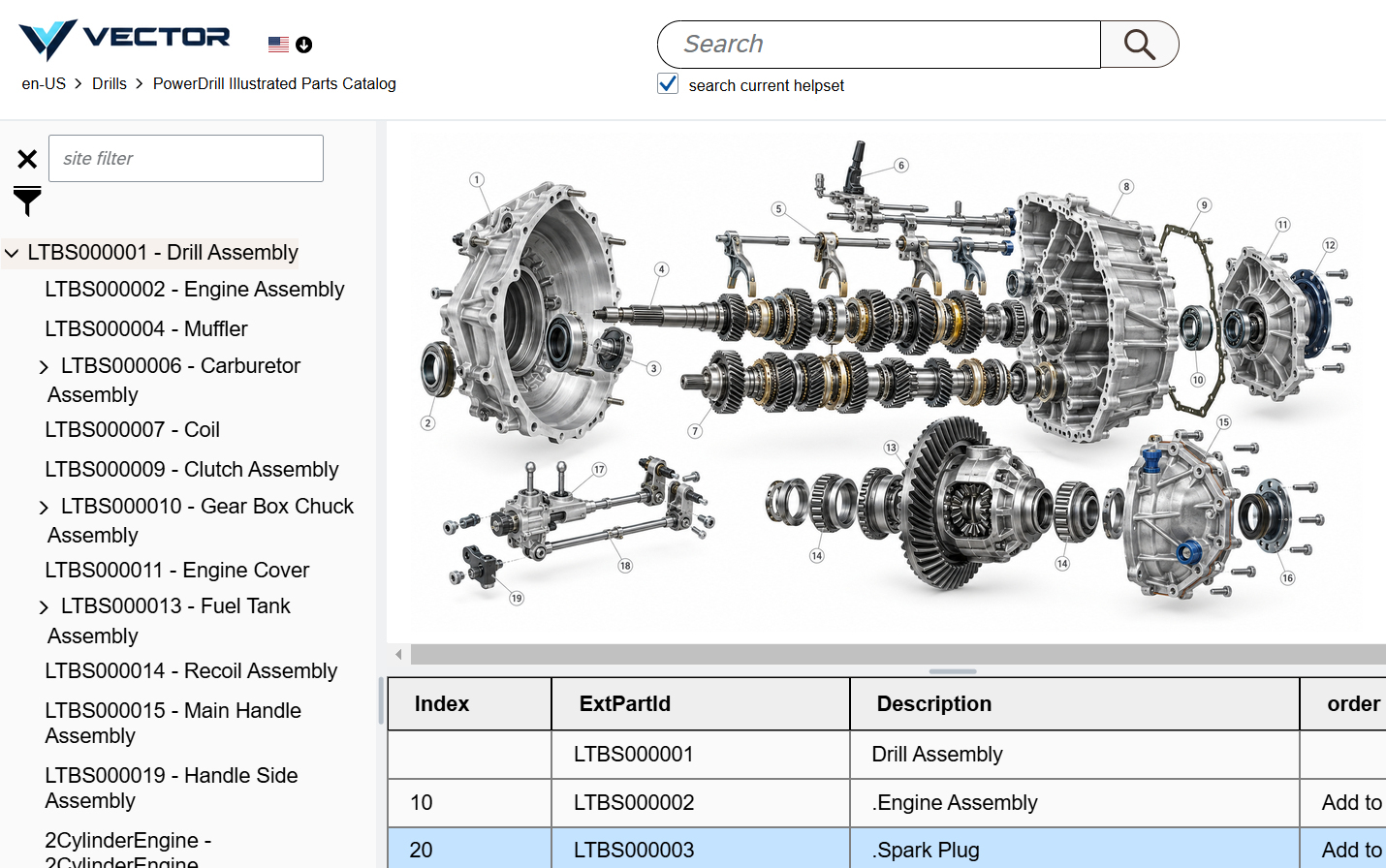
A new model year does not remove the need to support earlier vehicles. Shared content must remain reusable while released instructions stay appropriate to products still in service.
XDocs provides content versioning, branching, and release-management tools. Browser-based review lets subject matter experts contribute feedback before publication.
Localization management supports sending changed content for translation while work continues in the source language, helping teams coordinate multilingual updates.
Owners, dealers, and service teams use documentation differently. Their information should be easy to find and appropriate to their access permissions.
XDelivery brings technical content from multiple sources into a searchable portal. Metadata filters, full-text search, and a mobile-responsive interface help users reach relevant information. PDF, HTML, video, graphics, and other supported formats can be available through the same environment.
Headless delivery options can support an existing support experience. Confirm the integration and access model against your channels and users.
See how XDelivery worksBluestream’s warehouse-equipment customer case study describes an implementation that imports site-specific, as-built BOMs from ERP, connects CAD callouts to parts data, and publishes customer-specific IPCs through XDelivery.
Installation and maintenance content can use the same parts information and link to the catalogue. This is a warehouse-manufacturing example of the connected workflow.
Read the warehouse-equipment case studyConsider a vehicle family with two equipment configurations and multiple market requirements.
Agree configuration data, identifiers, and source revisions.
Create shared topics and instructions for the features that differ.
Match content to configuration, market, audience, and language.
Check procedures, parts references, illustrations, and warnings together.
Release approved outputs and check what users receive.
Where a VIN-based experience is required, a suitable integration can use the VIN to retrieve the manufacturer’s build record. The detailed configuration comes from that record. This workflow requires agreed mappings, applicability rules, validation, and permissions.
Read the personalized automotive documentation scenarioReusable topics and meaningful metadata help preserve the context around a component, procedure, or product configuration. That structure can support future search and AI-assisted experiences alongside your existing publishing needs.
Accurate AI answers still require suitable retrieval, access controls, source references, and testing. Approved technical procedures and qualified review remain essential, particularly for safety-critical work.
DITA provides an XML-based structure for reusable technical content. A CCMS adds tools to manage that content, its relationships, reviews, versions, and releases. Together, they help teams maintain documentation across complex products and publication requirements.
Yes. Shared topics can be reused wherever they apply, while metadata and publishing rules select configuration-specific information. Your team must define and validate those rules against the source product data.
No. The implementation connects relevant product and parts data to documentation workflows. Data ownership, interfaces, revision handling, and update frequency should be agreed for each source system.
Data updates can be automated within a configured workflow. A part change may also require new procedures, illustrations, or warnings. Those changes need technical assessment and approval before release.
A focused starting point lets your team evaluate reuse, applicability, source-data connections, and publishing requirements before expanding. Bring a representative content set and a recent product change to the discussion.
Tell us which vehicle or component families you support, where your parts data lives, and how your users access documentation.
We’ll discuss the content, integration, and delivery requirements and show the relevant XDocs Manufacturing Suite capabilities.
Type at least two characters or choose a filter to browse.