
Illustrated parts catalogues.
Connected to the right part.
From an exploded view to the information a technician needs.
Generate interactive parts catalogues from BOM data and CAD illustrations. Help technicians and customers identify components accurately, then connect them to the parts and service information behind the diagram.
Visual identification · Connected data · Faster service

Build the connection.
Skip the manual tagging.
An illustrated parts catalogue can be much more than a static document.
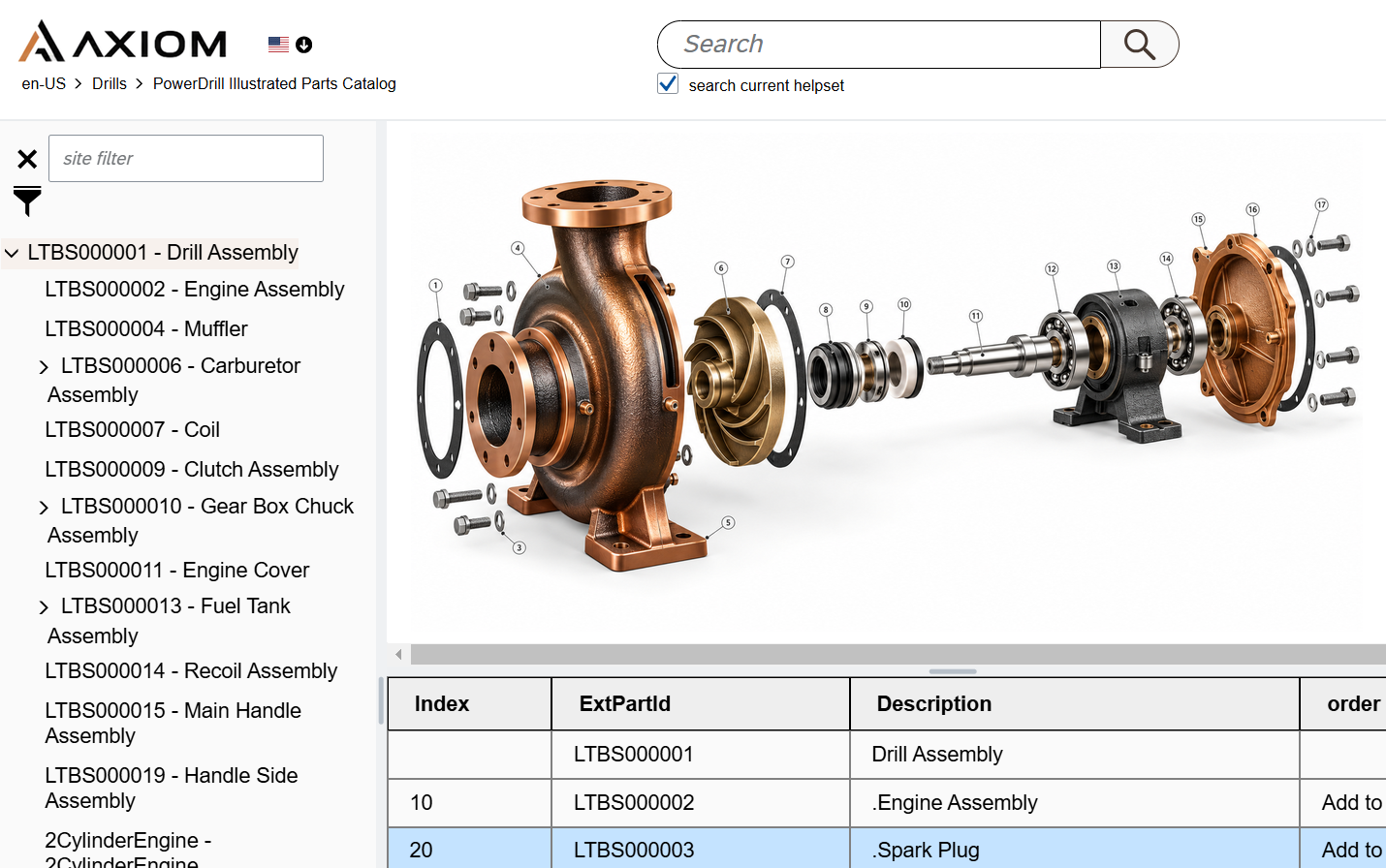
The XDocs Manufacturing Suite generates interactive IPCs from BOM data and CAD illustrations, with hot-spot links between the diagram and its parts entries.
Users can visually locate a component and move directly to the information they need to order it. The catalogue remains connected to its underlying parts data, reducing the manual work involved in creating and maintaining those links.
Clearer identification.
A smoother service experience.
Give technicians, dealers, and customers a direct route to reliable parts information, so your team can spend less time answering routine identification questions.
Find the correct part
Clear visuals, part numbers, and structured product information help users identify the component they need.
Reduce support calls
Self-service access to parts information can reduce reliance on manufacturer support and free staff for more complex enquiries.
Support faster repairs
Accessible parts and service information helps technicians work more efficiently and reduce equipment downtime.
From a repair procedure
to the part that matters
Keep diagrams, parts data, and service documentation connected.
Semantically tagged parts data in XDocs can be linked directly from service manuals and technical guides, as well as from the IPC.
A technician can move from a repair procedure to the relevant part information within the documentation, with less searching between disconnected resources.
Structured, metadata-rich DITA content gives those links a consistent foundation and helps teams manage product knowledge across the service lifecycle.
See it. Identify it.
Put the information to work.
Bring the visual and the data together at the point of need.
Open the assembly
Use the catalogue structure to reach the relevant equipment assembly.
Find it visually
Identify the component in its exploded-view illustration.
Follow the hot spot
Move from the diagram to the matching parts entry and identifier.
Use the details
Access the parts information needed for ordering and connect it with service documentation.
Keep repair information useful as products age
Parts information and service documentation can accumulate across years of product changes. Connecting them to structured source data helps manufacturers manage that growing body of information.
For businesses serving EU markets, accessible repair and parts information also matters in the context of applicable right-to-repair requirements.
One connected approach
to product information
Extend the value of the content behind your catalogue.
Explore how XDocs helps manufacturers manage complex technical content, streamline documentation workflows, and deliver accurate product information across the service lifecycle.
Return to the Manufacturing Hub →Illustrated parts catalogue FAQs
What makes an IPC interactive?
Hot spots connect components in an illustration to their corresponding parts entries. A user can locate the component visually and follow the link to its part number and related information.
How does XDocs create the catalogue?
The XDocs Manufacturing Suite generates interactive IPCs from BOM data and CAD illustrations, including hot-spot links between diagrams and parts entries. This reduces the need to tag those connections manually.
Can parts information connect to a service manual?
Yes. Because parts data is semantically tagged in XDocs, it can be linked directly from service manuals and technical guides as well as the IPC itself.
Does an IPC guarantee right-to-repair compliance?
No. An IPC can help make parts information accessible. Legal duties depend on the product category, applicable EU product rules, and national implementation. Manufacturers should assess the requirements that apply to their products.
Your parts data.
Your illustrations.
Your next demo.
Explore interactive parts catalogues for your manufacturing team.
Tell us about your BOM data, CAD illustrations, and the service documentation your technicians and customers use.
We’ll discuss how the XDocs Manufacturing Suite could fit your parts-information workflow.