
Reviewing and Collaborating
Bring expert feedback into the content workflow
XDocs DITA CCMS connects browser-based review, tracked changes, comments and approval history so subject matter experts can contribute directly to technical documentation.
See XDocs in action- Assign review work
- Discuss in context
- Review together
- Record approvals
01 / Review workflows
Connect review tasks to the documentation process
Send individual topics, chapters or entire documents to one or more colleagues for browser-based review or collaboration.
Configure ad hoc or organization-wide workflows. Customize email notifications with document links so reviewers can start their tasks.
02 / Tracked changes and comments
Keep suggestions attached to the content
XDocs integrates Oxygen Web Author with a simplified interface for review and collaboration. Reviewers have tracked changes locked on.
Authors and editors can accept or reject suggestions. Teams can reply to comments, mark issues resolved or return them for clarification.
03 / Approval history
Record decisions and route the next step
Request approval for a topic, section or complete document through configurable workflows.
Reviewer responses are recorded in workflow history and can determine routing or file status. Workflow managers can access approval history after a workflow finishes.
04 / Concurrent review
Let experts review the same content together
XDocs Explorer in the Web (WEX) supports simultaneous reviews, with participants seeing markup and comments in real time.
Later reviewers can use retained markup and threaded comments to join the discussion. Authorized users can resolve the review feedback.
05 / Content contribution
Make browser-based contributions practical
Contributors can upload images and other files or create content from templates in a browser.
Workflow notifications can link contributors to WEX. Other tools can integrate to automate content creation and uploads.
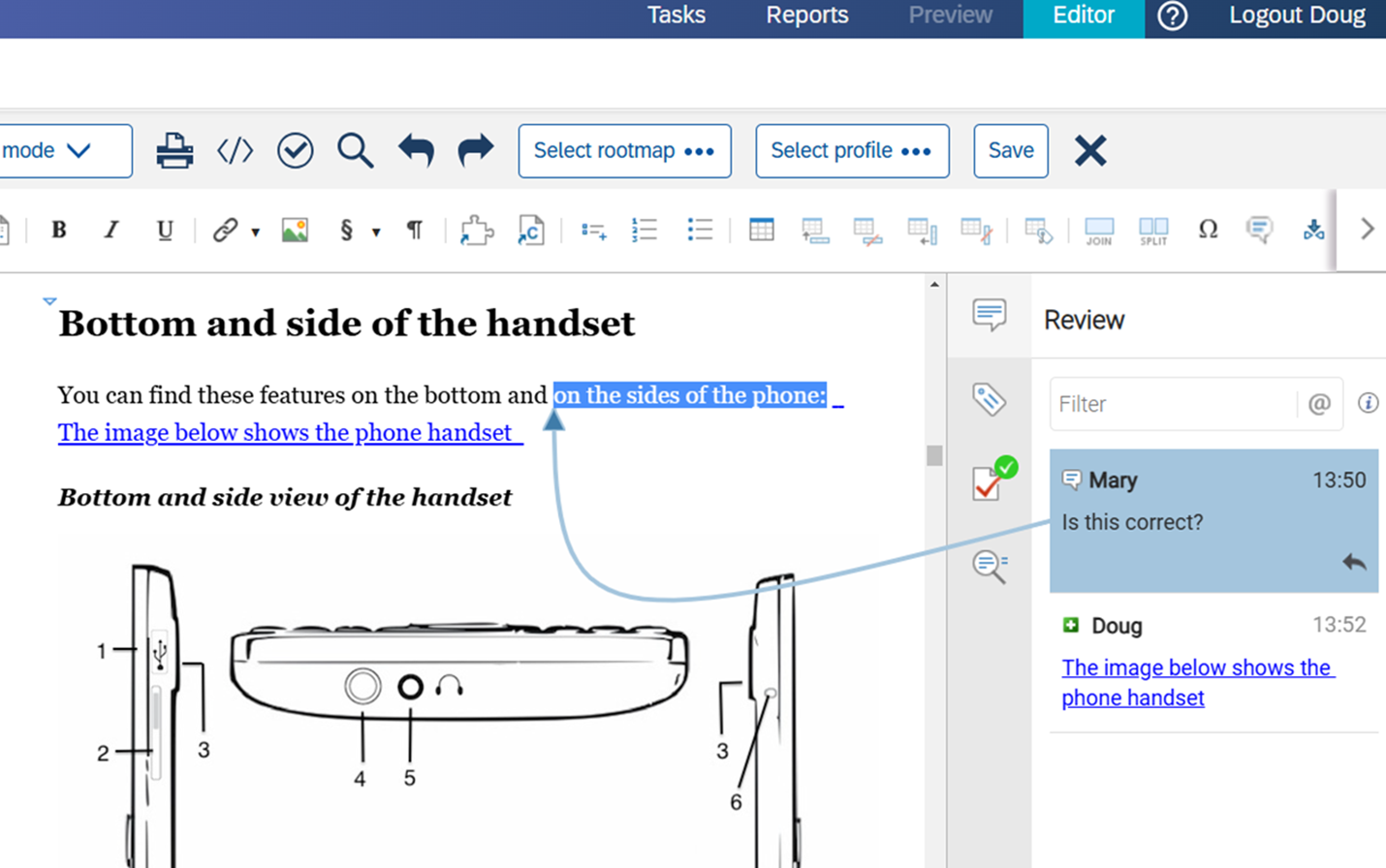
Reviewing and Collaborating in XDocs
Feedback stays with the source
Review suggestions, threaded discussion and approval decisions remain connected to the content your experts know.
Structured content / AI-ready foundations
A maintained source for connected knowledge
Expert review and recorded decisions help teams maintain the quality of their structured source. That governed content can support connected AI initiatives alongside appropriate retrieval and delivery tools.
AI outcomes depend on content quality, retrieval and the tools you connect.
Questions about reviewing and collaborating
Practical answers for your team
Do reviewers need a desktop authoring application?
The documented review workflow supports review and collaboration in a web browser through the integrated tools.
Can several reviewers work at the same time?
Yes. WEX supports concurrent reviews, with participants able to see each other’s markup and comments in real time.
Can approval decisions be checked later?
Yes. Reviewer responses are retained in workflow history, and workflow managers can access that history after the workflow is complete.
Related resources
Explore supporting guides and customer stories
Explore reviewing and collaborating in XDocs
Contact Bluestream
Tell us a little about your team and what you’d like to achieve. If you’re requesting a demo, mention the product or challenge you’re interested in.
Read our Privacy Policy for information about how Bluestream handles your data.