
Manufacturing / An industrial field guide
Bluestream &
Manufacturing
From the drawing board to the field.
Complex machines present unique challenges for organizations from the 'drawing board’, through manufacture, delivery and ongoing servicing.
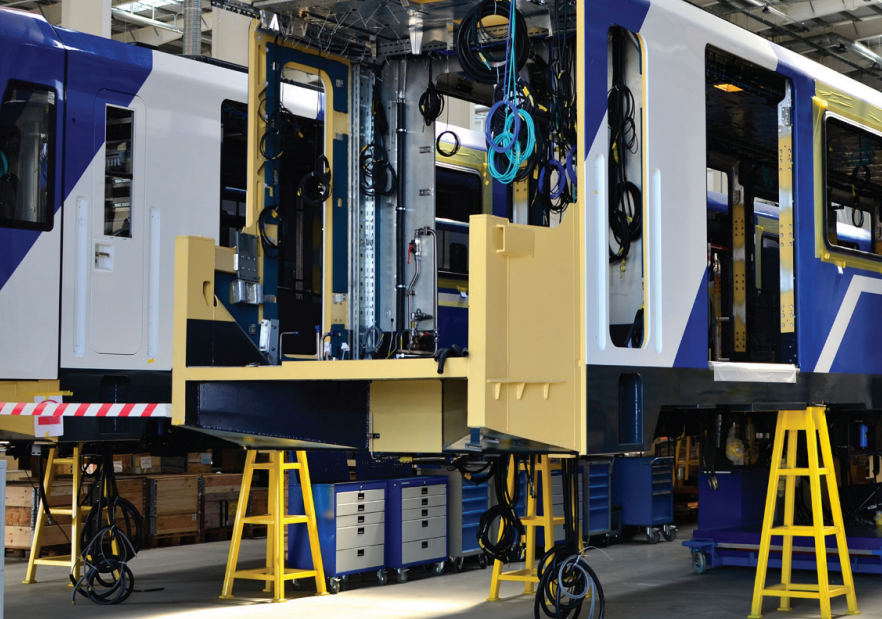
Machine longevity presents its own challenges
Whilst not necessarily the first thing that comes to mind, consideration of the authoring platform is very important.
Large equipment, complex machines and ‘smart’ factories are expected to last many years. They often remain in use 20+ years after first commissioning. Equipment may change owners multiple times and is also likely to undergo modifications and updates. Just like a car or motorcycle, anything with moving parts needs regular maintenance to work at its optimum. Unlike cars or motorcycles, specialist machines do not have tens of thousands of trained technicians available to maintain them.
This creates a far greater reliance on technical manuals and other technical content. When equipment changes, the documentation needs to reflect those changes. The original content must therefore remain editable.
For over 20 years, XML has been the preferred language for technical documentation. Since 2005, DITA has been the preferred XML standard to use. XML separates content from formatting. This allows publication in various formats, including PDF for print and XHTML/HTML5 for online use.
XML authoring is supported by many different editors and will still be accessible in 40 years’ time, the same may not be true of unstructured editing tools.
Every configuration is different
Complex Machines & Solutions Are Often Customized
A train manufacturer will offer various options to customers dependent upon their geographic location and their specific needs. This may include braking systems, air conditioning, driver auctions and much more.
A company supplying air traffic control equipment will also have many options both for hardware and software. A company supplying wind farms will again have different options for different conditions; onshore or offshore ground conditions, accessibility etc.
02 / The build stage
The BOM field guide
Data is stored in different places
Modern companies use many different systems ERP, PLM, PIM, CAD, CRM and more. All of these systems hold data which is needed by the technical authors for the creation of the various documents that support the equipment. A lot of this data is stored as BOMs (Bills of Materials).
There are lots of different types of BOMs each serving a different purpose:
01ManufacturingManufacturing Bill of Materials (mBOM)
Manufacturing BOMs (mBOM) show
all the parts and assemblies required to build a finished product. They must also include parts that need processing before assembly. Their information is sent to all the integrated business systems involved, including enterprise resource planning (ERP) and materials resource planning (MRP). mBOMs are the most common type of BOM for a manufacturing company.
02EngineeringEngineering Bill of Materials (eBOM)
The engineering BOM (eBOM) is developed during the product design phase and is often based on Computer-Aided Design (CAD) or Electronic Design Automation (EDA) tools.
It lists the items, parts, components, sub-assemblies and assemblies in the product as designed by the engineering team. More than one eBOM can be associated with the finished product.
03ServiceService BOM
The Service BOM (developed during the design
phase) typically includes a list of all the parts,
installation steps and repair instructions that service
technicians use when installing, or servicing a product.
04SalesSales BOM
Unlike other types of BOMs, a Sales BOM provides details of a finished product prior to its assembly during the sales phase. In a Sales BOM, both the finished product and the components appear as separate items in the sales order document.
The parent item is listed only as a sales item, rather than as an inventory item, the children are listed as subitems.
05AssemblyAssembly Bill of Materials
An assembly BOM is similar to a Sales BOM in which the parent item is listed as a sales item and not an inventory item.
However, a notable difference is that unlike the Sales BOM, only the finished product appears in the sales document.
Assembly BOMs can be either single-level or multi-level
06ProductionProduction BOM
A Production BOM often serves as the foundation for a production order. It lists the components and subassemblies that comprise a finished product, as well as prices, descriptions, quantities and associated units of measure.
During the production process, physical components can be converted into actual finished products
07StructureSingle-Level BOM
A single-level BOM is typically used for products whose constructions are not complex and do not include sub-assemblies. Typically, this document contains a total count of all the parts used in the construction of a product and those parts are listed in part number order. The structure of this type of document only allows for one level of children in components, assemblies and material.
08StructureMulti-Level BOM
Multi-level BOMs are used for more complex
constructions and include sub-assemblies, (which may include further levels of sub-assemblies). Each item number (either a raw material or labor) must associate with a parent item, except at the top-most level.
With information stored in so many places it is easy for mistakes to creep in which can have very serious consequences.
03 / Connect the information
Bluestream XDocs Manufacturing Suite
The manufacturing suite has been developed to support companies delivering complex equipment and solutions including machines, hardware and software.
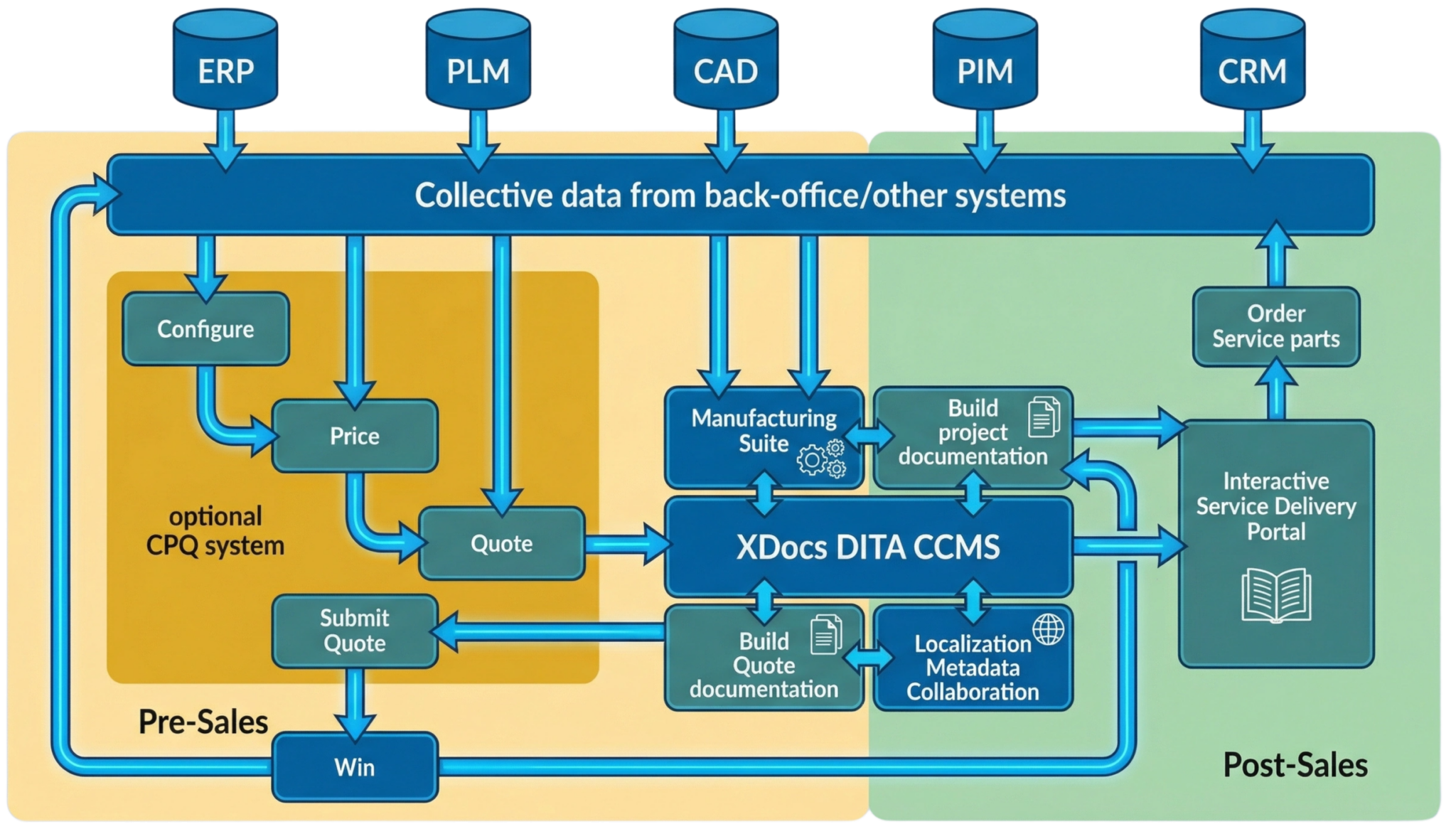
- 1Source systems
ERP, PLM, CAD, PIM and CRM hold the product information.
- 2Structured content
XDocs connects the information with authoring and publishing.
- 3Lifecycle delivery
Quotations, documentation and service information reach their audiences.
The lifecycle / Quote
Presales – it starts with a quote
A quotation is not the first stage of the sales cycle, but it is needed at some point. Producing it may involve a configure, price, quote (CPQ) system. These tools can connect to ERP and CRM systems and use selection screens to build pricing.
Once the quotation is accepted, bills of materials (BOMs) often support the manufacturing stage.
Reuse content in quotations
XML and DITA make it easy to create standard ‘boilerplate content’ and reuse it across quotations. Examples include product descriptions, functionality matrices and more. A component content management system (CCMS) makes this content much easier to curate. The content can also be easily localized. XDocs DITA CCMS can integrate with CPQ systems. It can automatically generate supporting information for quotations based on a particular configuration, then publish it as a PDF or online.
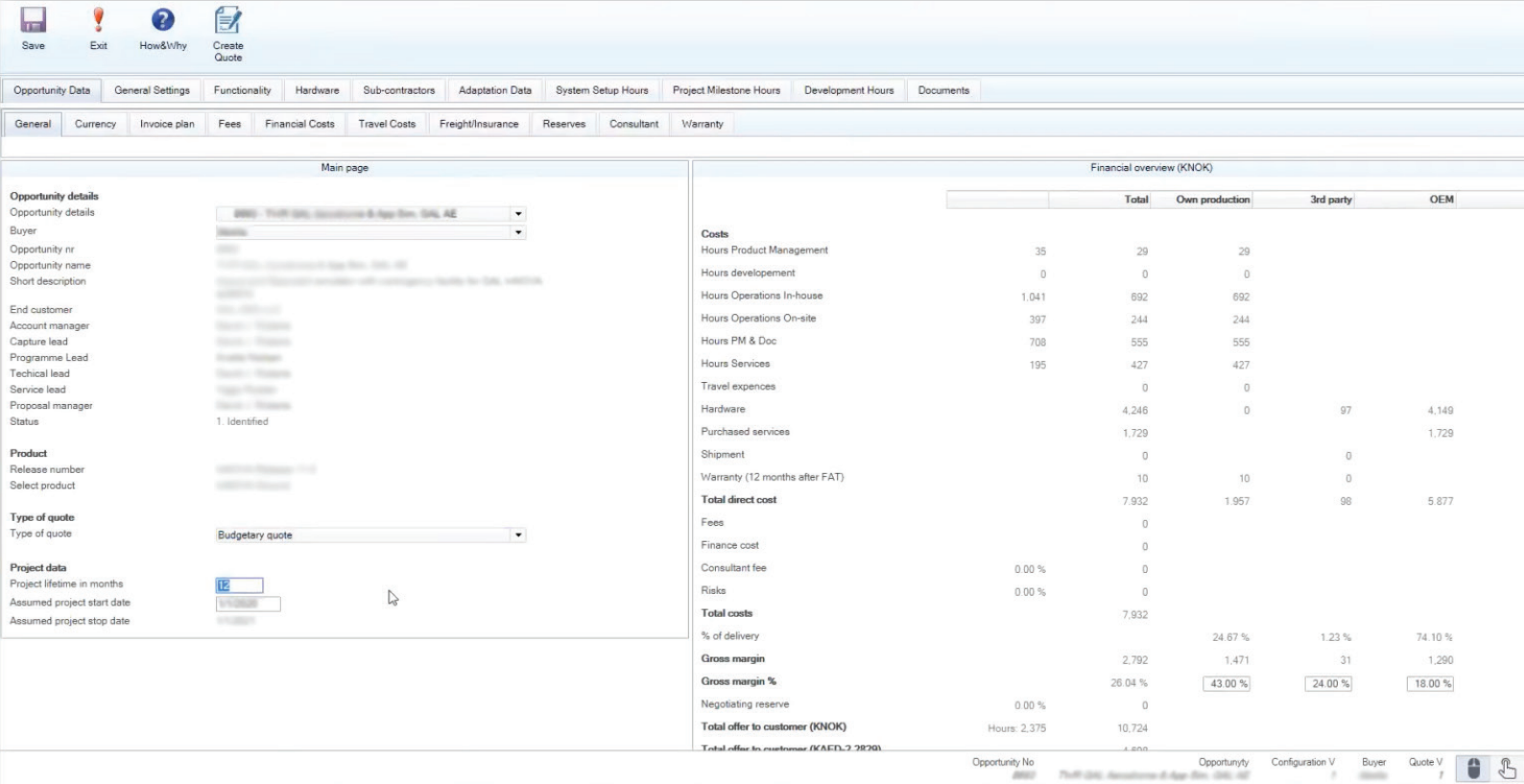
Reusable product descriptions and configuration-specific information support the quotation.
The lifecycle / Deliver
Documentation at delivery
Complex solutions often require technical documentation alongside the quotation. Once the equipment is built and delivered, it has further documentation requirements. The documentation may be printed from a PDF or, more likely, delivered electronically. It may include installation guides, user guides, maintenance schedules and troubleshooting information. Other examples include illustrated parts catalogues (IPCs) and interactive electronic technical manuals (IETMs).
These guides may also need to be delivered in multiple languages.
XML and DITA are ideally suited to all of this.
Generate documentation from product data
XDocs Manufacturing Suite has connectors for other systems that companies use, including ERP and PLM. These make information available to technical authors, reducing the chance of errors and speeding the writing process. The suite supports all types of BOM. Authors can import and manage these within the system. The system can also automatically generate documentation from these BOMs.
The lifecycle / Maintain
Information for the field
Problems in the field
Engineers in the field often only have access to bulky, out-of-date printed manuals.
These don’t show machine-specific modifications and make it hard to identify replacement parts.
The right information for the machine in front of you.
IPCs (Illustrated Parts Catalogues)
IPCs help engineers easily identify components using General Assembly, Sub-Assembly and exploded component drawings. XDocs Manufacturing Suite supports the creation of illustrated parts catalogues. Authors can import CAD drawings and diagrams, then use the built-in hot-spotting tool to link part numbers. The suite also supports browser-based review of all content before approved publishing. Subject matter experts (SMEs) can easily join review cycles through XDocs WEX. This is a simple-to-use, browser-based review and collaboration application. An electronic IPC can easily link to a fulfilment system. This enables field engineers to instantly request replacement parts directly from the manufacturer. IPCs reduce the chance of ordering the wrong part and create a valuable revenue stream.
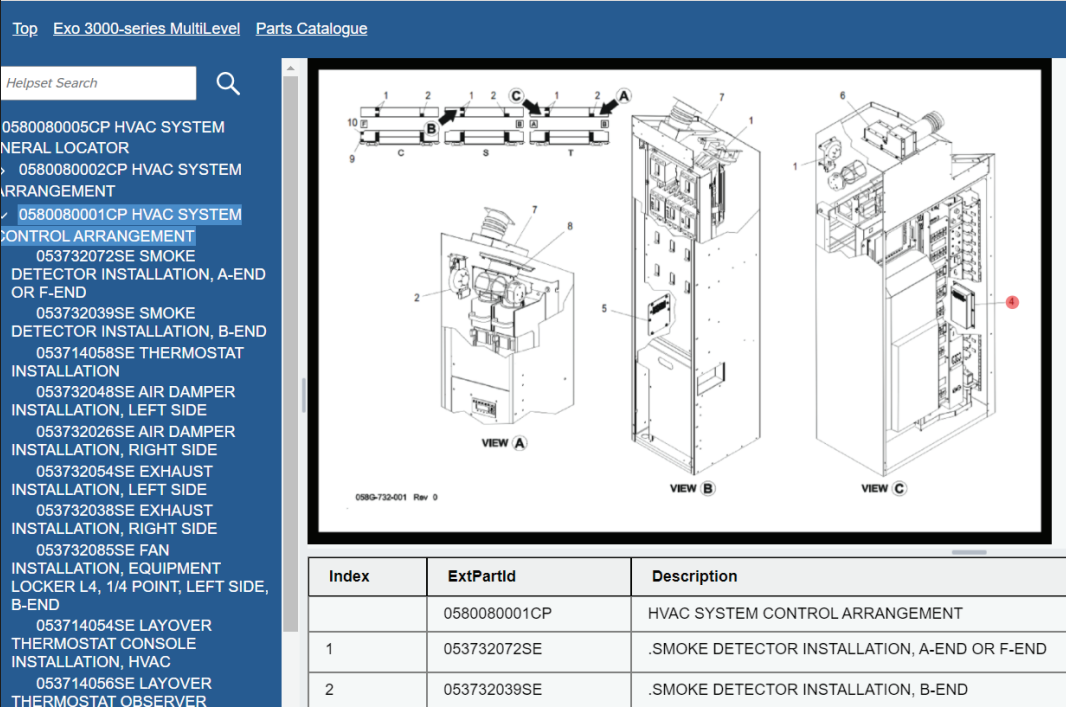
- 1Browse the assembly
The navigation tree provides a route through the equipment.
- 2Identify visually
The exploded drawing helps locate the component.
- 3Find the part
The parts table connects the illustration to identifying information.
In practice
Anonymous manufacturer
Warehouse equipment
A published Bluestream case study
From an as-built BOM to site-specific parts information
Bluestream’s warehouse-equipment case study describes an anonymous manufacturer using as-built ERP bills of materials and CAD diagrams to publish site-specific illustrated parts catalogues. Parts information also supports service documentation and multilingual ordering.
Read the warehouse-equipment case studySource: Bluestream’s published customer case study. The manufacturer is not named.
One place to find service information
Interactive Service Documentation Portal
Bluestream has developed its own delivery platform, which links directly to the core XDocs database. Customers can use it to create interactive service delivery portals. These portals can make all technical documentation available to customers and engineers according to their permissions.

The combined solution
Benefits of the Combined Solution
With XDocs Manufacturing Suite you control the flow of ‘Service Information’ from Engineering to Fulfilment:
- Create better documentation faster, reuse content with confidence and update information with ease.
- A streamlined workflow for producing integrated service documentation.
- Build IPCs, Maintenance Schedules, Installation Guides etc. and localize them to any language
- Rapid information updates across all output formats, including IPCs, documents and maintenance schedules.
- Full control of the information flow:
- Audit trail (what changed, when and by whom)
- Instant comparison between versions.
- Helps ensure data consistency and integrity.
- Eliminates system redundancy.
- Build fully customizable Web-based Delivery Portals
Bring your information together
See XDocs + PLM in action
If the challenges and opportunities outlined in this whitepaper resonate with your organization, Bluestream is here to help.
Whether you are looking to streamline technical documentation, improve content reuse, or better manage complex manufacturing information, our team has the expertise to support you. Get in touch with us to discuss your specific needs, explore tailored solutions, and learn how Bluestream can help you increase efficiency, reduce complexity, and future-proof your documentation strategy.