

CCMS fundamentals

What Is a CCMS? A Guide to Component Content Management

An organized cabinet of reusable topic cards supplies several publications, illustrating a CCMS.

Understand the modelFollow a content changeAssess the fit

A CCMS, or Component Content Management System, manages content as reusable pieces and tracks the relationships between them. Instead of maintaining a separate copy of a procedure in every manual, a team can manage an authoritative component and use it in several deliverables.

For technical documentation, that can mean managing topics, maps, warnings, graphics, and supporting assets alongside their versions, metadata, review status, and translations. A CCMS is especially useful when those relationships are becoming harder to control through whole documents and manual coordination.

What does a CCMS do?

A CCMS supports the lifecycle around structured information. Authors create and update components, reviewers assess them, and the organization assembles approved versions into publications. Capabilities vary by product and deployment, but common requirements include:

  • Reuse management: Find existing content and identify where it is used.
  • Version and release control: Preserve history and the content associated with a particular release.
  • Metadata and discovery: Describe content so it can be found, filtered, and reported on.
  • Workflow: Route changes through contribution, review, and approval.
  • Localization: Coordinate source and translated content through update cycles.
  • Publishing: Assemble content for the required formats and delivery channels.

The value is in how those capabilities work together. Reusing a warning is useful; knowing which manuals depend on it, who approved a revision, and which languages need updating is what makes the reuse manageable.
How does a CCMS differ from a CMS?

A web content management system commonly focuses on creating and delivering website content. A document management system commonly focuses on files, records, and their controls. A CCMS emphasizes the reusable components inside information products and the dependencies that connect them.

These categories overlap. Modern CMS platforms can also support structured fields and reusable content, and some headless systems manage modular information extensively. The useful distinction is therefore the depth of support for your documentation lifecycle, not a claim that every CMS stores only complete pages.

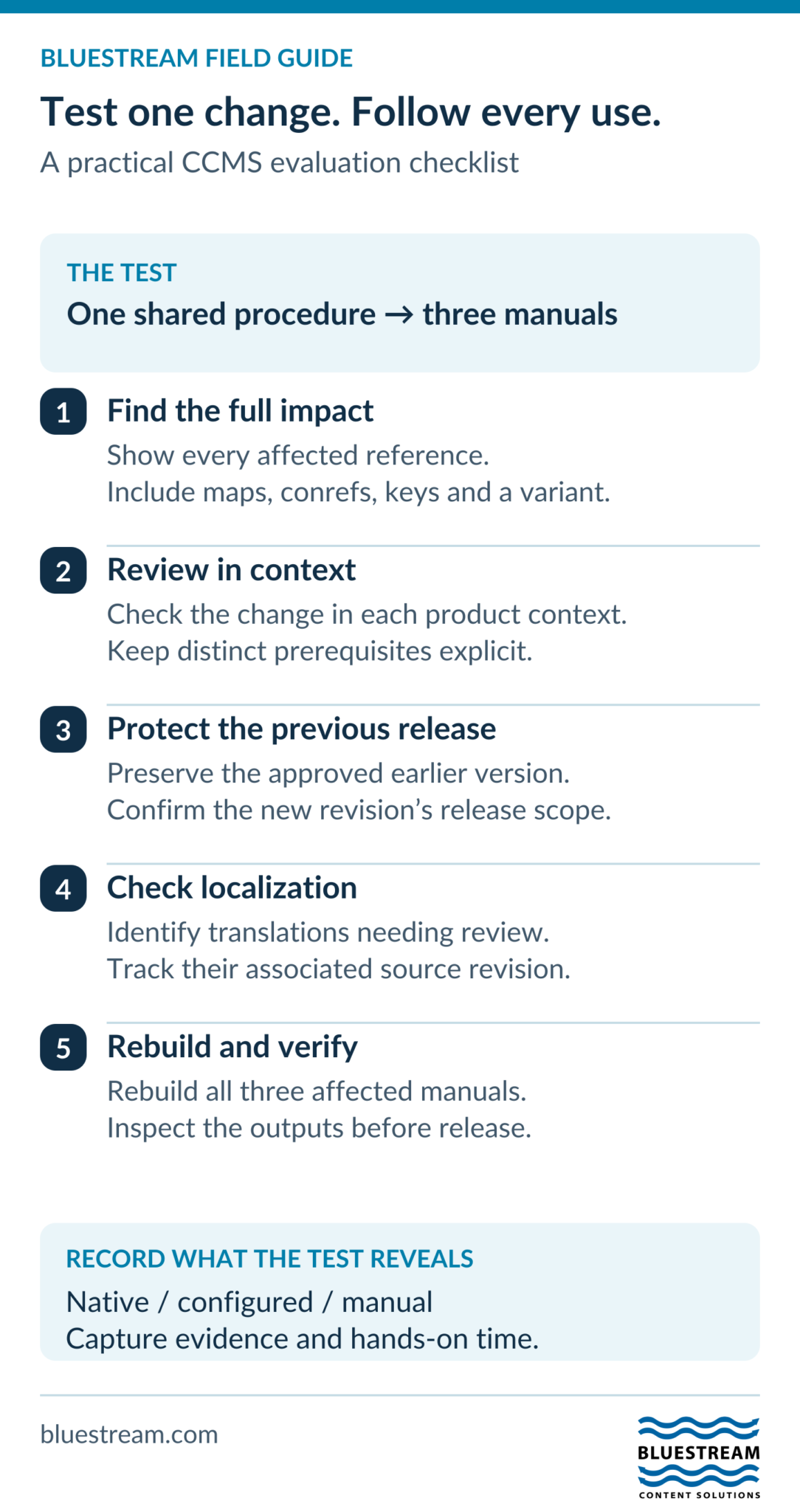
Compare systems using the same content change. Ask each vendor to update one procedure reused in three manuals, show every affected reference, preserve the previous released version, and identify translations requiring review. Then rebuild the affected outputs.

For a DITA implementation, include maps, content references, keys, and a product variant in the test. Record which steps the system understands directly, which require configuration, and which remain manual. This gives you evidence about documentation lifecycle support beyond the vendor’s choice of ‘CMS’ or ‘CCMS’ label.

CCMS evaluation checklist following one shared procedure through three manuals, review, release control, localization and rebuilt outputs.
Use one representative content change to compare systems. Record evidence, effort, and whether each step is native, configured, or manual.
Text version of this visual

A CCMS evaluation checklist: update one shared procedure used in three manuals. Inspect every reference, review product contexts, preserve the previous release, identify affected translations, and rebuild and inspect all outputs. Record which steps are native, configured, or manual.

What are components, and where does DITA fit?

A component is a meaningful unit of information that can be managed or reused. A complete task might explain how to install a module. A reference topic might list its specifications. A smaller fragment might hold an approved warning used in several procedures.

The OASIS DITA standard provides a structured model used by many technical documentation teams. Authors create topics with semantic elements and organize them through maps. The structure describes what the information means, allowing publishing tools to present it in different ways.

DITA and CCMS are different things. DITA is a content architecture and standard; a CCMS is software for managing content. A team can use DITA without a CCMS, and CCMS products can support different content models. For a DITA implementation, check the precise version, specializations, and processing requirements your platform supports.

For a closer look at topic and fragment granularity, see what a component means in a CCMS.

A simple example: one procedure, several manuals

Imagine a manufacturer whose three product families share a calibration procedure. The procedure appears in service manuals and in a technician portal. Each product also has some unique prerequisites.

With independent copies, a change requires finding every occurrence, updating the right ones, and checking that nothing was missed. In a component-based workflow, the shared procedure has an identifiable source. Product-specific prerequisites can remain separate or be handled through a carefully designed variant strategy.

  1. The author finds the shared procedure and inspects its uses.
  2. Engineering reviews the proposed change in the relevant product contexts.
  3. The approved revision is associated with the intended release.
  4. Localization identifies affected translated content.
  5. Publishing produces the required manuals and portal content.

This is an illustrative workflow, not an automatic guarantee. Permissions, release policies, and publishing configuration determine how it works. A change to working source should not silently overwrite an older released manual that must remain unchanged.

Which documentation problems can a CCMS address?

Repeated maintenance

Shared components reduce the need to edit equivalent information in several places. Reuse works best when content is genuinely common and remains understandable in each context. Poorly designed reuse can conceal important differences, so authors still need clear rules.

Unclear ownership and review status

A managed workflow can make assignments and approvals visible. It can also reduce the need to reconcile comments from several disconnected copies. The process needs named owners and a definition of what approval covers.

Complex releases and variants

Metadata, conditional publishing, and branching can support product differences and parallel releases. They solve different problems. A maintained legacy release may need a separate branch, while a regional variation within one release may be handled through controlled filtering.

Translation coordination

A component-aware process can identify changed source and associate returned translations with the correct version. Existing translation memory, linguistic review, formatting, and supplier practices still affect the result. Savings should be measured against your current workflow.

Manual publishing work

Configured publishing can apply repeatable presentation rules and assemble approved content for multiple outputs. Templates require maintenance, and generated output still needs quality checks. Automating assembly does not remove responsibility for the information readers receive.

Who should consider a CCMS?

Consider a CCMS when your team is struggling with the relationships between content, products, languages, and releases. The number of writers alone is a poor guide. A small team maintaining highly reused multilingual manuals may have a substantial need; a larger team producing unrelated one-off documents may not.

Useful signals include repeated copy-and-paste updates, uncertainty about which source was released, substantial review coordination, difficult localization packaging, and a growing number of product variants. Regulated documentation may add control and reporting requirements, but a CCMS does not by itself guarantee compliance.

Before buying, inventory your content, define a manageable model, and test a representative workflow. Include migration, training, administration, and publishing configuration in the cost. A clear content strategy is as important as the software.

Where XDocs fits

Bluestream XDocs DITA CCMS supports the managed lifecycle of DITA content. Its tools address authoring, review, metadata, releases, and localization. Bluestream also offers manufacturing-specific parts workflows and the XDelivery Documentation Portal for customer-facing delivery.

Keep those responsibilities clear during evaluation. The CCMS manages source content and its lifecycle; a delivery platform shapes how readers discover and use published information. Assess the complete path with your content, including the final reader experience.

If you are comparing systems, the next step is a small, evidence-led pilot. Our CCMS evaluation guide explains how to turn requirements into practical tests.

Frequently asked questions

What does CCMS stand for?

Component Content Management System. It manages reusable content units and their relationships through activities such as authoring, review, versioning, localization, and publication.

Does every CCMS use DITA XML?

No. Content models and supported formats vary. If you need DITA, verify the version, specializations, reference handling, and publishing compatibility required by your content.

Is a CCMS the same as a documentation portal?

No. A CCMS manages the source and its lifecycle. A documentation portal delivers information to readers through navigation, search, access controls, and other user-facing features. The two can be integrated.

Can a CCMS eliminate all duplicated content?

No. It provides tools to manage reuse, but the team must identify equivalent information, choose sensible component boundaries, and maintain ownership. Some similar-looking content needs to remain different because its meaning or applicability differs.

Contact Us

Sign-up for the latest Bluestream News

Close