
AUTHORING SYSTEMS / OXYGEN + CCMS
Why Authoring in Oxygen’s Desktop Applications Remains the Preferred Solution for Technical Writers
Deep authoring. Connected content. Collaborative review.
Explore the comparison
Built for the
working writer.
Structured content · Reuse · Precision
Open the
conversation.
Expert feedback, in the browser.
Two working environments.
One connected content lifecycle.
THE CONNECTED WORKFLOW
Give each role the right working environment.
Oxygen desktop authoring supports complex structured content. Technical writers use Oxygen XML Author and XML Editor to create, structure and reuse content. Browser-based review can bring subject matter experts into the content workflow. Bluestream’s September 2025 article explored why poll respondents preferred the desktop applications.
- 01
Desktop authoring
Writers create, structure and reuse content in Oxygen XML Author or XML Editor.
Create with precision - 02
CCMS coordination
The repository manages versions, permissions, content relationships and review routing.
Keep the source connected - 03
Browser review
Subject matter experts contribute feedback through the configured web review environment.
Bring expertise into the loop
↶ Feedback returns to the author, with version history and workflow managed in the CCMS.
Illustrative workflow. Available behavior depends on the chosen products, connectors and configuration.
THE HISTORICAL SIGNAL / SEPTEMBER 2025
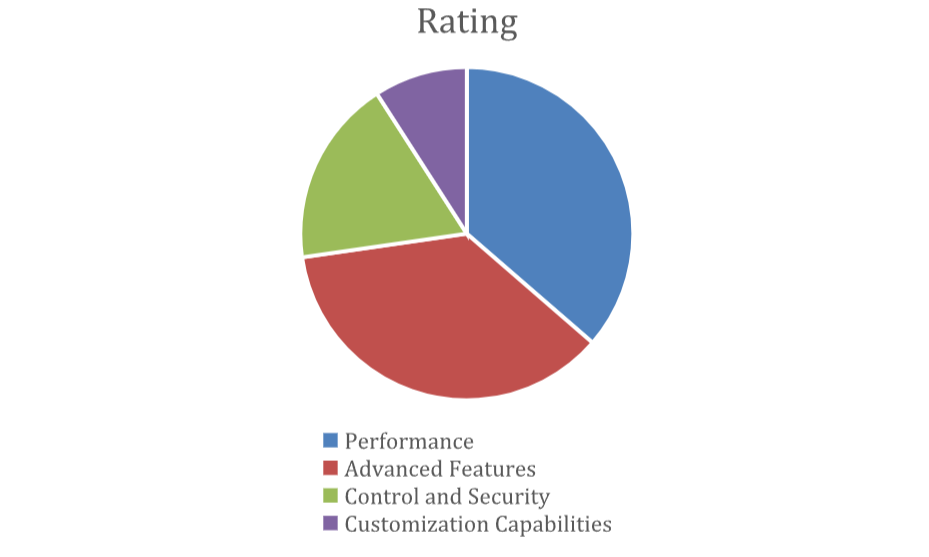
What desktop users valued.
Reasons respondents gave for choosing Oxygen desktop applications for authoring.
These are the percentages reported in the original September 2025 article. They total 99%. The article does not provide the sample size or methodology, so treat this as a directional poll, not a representative market study or a product benchmark.
THE COMPARISON DESK
Oxygen desktop vs. web:
compare your workflow
A role-based reading aid, not a product score. Choose a role to emphasize relevant rows; the complete comparison remains visible.
Concurrent editing: deployment checks worth reading
Oxygen’s version 28.1 documentation says the session initiator saves the document and must keep it open. Built-in Share Session support is connector-dependent. It also documents limits for multi-server load balancing, some extensions and XML source editing during a shared session. Check the version and integration you intend to deploy. Source [2]
Editorial comparison with current qualifications. No speed test, security rating or independent product scoring is implied.
Why writers choose the desktop
- Performance: Respondents valued Oxygen XML Author and XML Editor for managing complex documentation. Actual responsiveness depends on document size, hardware, network access and repository configuration; the poll is not a performance benchmark.
- Advanced Features: The tools offer a comprehensive suite of XML authoring and development capabilities, supporting popular XML documentation frameworks like DITA. They also allow users to create custom frameworks tailored to specific documentation needs.
- Customization capabilities: Oxygen’s desktop applications offer interface customization and configuration options that allow authors to adapt their authoring environment to their documentation standards, work habits and preferences. Evaluate the specific extensions your team uses when comparing desktop and web workflows.
Inside the authoring environment
Oxygen XML Author is ideal for power users such as Technical Writers. It offers:
- Author-focused Design: Specifically created for writers with a user-friendly authoring experience that makes it easier for users to work with structured content.
- Review and collaboration tools: Features like change-tracking, commenting, and a suite of other useful review tools provide writers with the ability to manage content reviews.
- Control: Writers can show tools and sidebars when needed, then hide them to make space. Other desktop settings let writers adapt the environment to their work.
- Connectivity: Seamless integration with XML databases, WebDAV resources, and especially Component Content Management Systems (CCMS) such as Bluestream XDocs allows for flexible content management and distribution.
Where web authoring fits
Oxygen Web Author provides a browser-based environment for authoring and review, without requiring each contributor to install the desktop editor. That can be useful for subject matter experts and other occasional contributors.
The historical case for desktop authoring centers on the specific tools, configuration and local integrations used by professional writers. Feature parity should be checked against those requirements, rather than assumed from the delivery model.
- Local work: Desktop applications can process local content without a continuous connection, while repository-dependent work still relies on access to the repository.
- Actual performance: Document complexity, hardware, browser, server and network all matter. The 2025 preference poll does not establish a universal desktop speed advantage.
- Extensibility: The current product evidence above qualifies the original blanket description of web customization as limited.
In summary, the decision should reflect each role’s required tools and the deployment you can support. Desktop authoring and browser collaboration can complement one another.
Combine desktop authoring
with browser review
Combining Oxygen’s desktop authoring applications with browser-based review can connect specialist authoring with feedback from a wider group of contributors. A CCMS workflow engine can coordinate that handoff.
Benefits of the combined solution
- Enhanced Collaboration: Oxygen’s web tools enable real-time review and feedback from subject matter experts and stakeholders without requiring them to install desktop software. This accelerates the review cycle and improves communication among team members.
- Seamless Workflow Integration: Writers can author content in Oxygen desktop applications and share it for review through Oxygen’s web tools. The content must be available through a web-accessible location. A CCMS workflow engine can coordinate the handoff between authoring and feedback.
- Accessibility and Flexibility: Cloud-based web review allows contributors to access documentation from any device or location, supporting distributed teams, and remote work environments.
- Improved Content Quality: The iterative review process using Oxygen desktop and web-based tools can help catch errors early and ensures that documentation meets quality standards before publication.
These are workflow benefits to validate in practice, not guaranteed reductions in review or release time.
Connect Oxygen authoring
to your CCMS
When Oxygen desktop applications are tightly integrated into a Component Content Management System (CCMS), Technical Writing teams can realize the full benefit of structured authoring and Oxygen.
A tight CCMS-integration offers significant advantages over solutions that merely provide a link to Oxygen desktop tools.
Advantages of tight integration
- Version Control and Traceability: Integrated workflows ensure that all changes are tracked within the CCMS, providing comprehensive version history and audit trails essential for compliance and quality assurance.
- Automated Workflow Management: Tight integration enables workflow routing, minimizing manual intervention, and accelerating documentation delivery.
- Security and access control: CCMS integration can centralize access and permissions. The security outcome depends on deployment architecture, authentication, configuration and operational controls, rather than whether the authoring interface is desktop- or browser-based.
- Link Integrity: When Oxygen desktop authoring tools are tightly integrated with the CCMS, authors can work from the map in Oxygen and open any topics for editing with automated checkout/checkin. Linking mechanisms like relationship tables work seamlessly.
- Consistency and Reuse: Integration supports content reuse and consistency across multiple documents and projects by leveraging CCMS capabilities directly within Oxygen Desktop. Reuse mechanisms such as conrefs, keys, and graphics libraries work as if the entire document were on the desktop.
- Document view: The entire document can be opened for editing in Oxygen’s resolved topics view, then checked back in when editing is complete.
- Centralized management of templates, DTDs, and metadata: An administrator can manage templates, DTDs and Schematron rules centrally in the CCMS. Authors do not need to maintain separate copies. The server also manages profiling attributes: @product, @platform, @audience, @rev, @props and @otherprops. This helps authors use consistent attributes for content processing and filtering.
- UI customization: Administrators can manage and distribute Oxygen interface plugins from a central location on the CCMS server. This simplifies plugin deployment and editor configuration.
- Branch/merge: Branched content can be edited using the same tight integration. When merging content, changes from the branch can be accepted or rejected through the Oxygen interface, fully integrated with the CCMS.
- Streamlined Content Management: Direct integration allows writers to access, edit, and manage content stored within the CCMS without leaving the Oxygen desktop environment, reducing context switching, and improving efficiency.
Oxygen desktop authoring remains a strong option for teams that rely on its advanced features and tailored workflows. Combined with a CCMS and web-based review, it can support collaboration while retaining a specialist authoring environment.
Deep integration provides more than a link to an editor: it connects authoring to content relationships, managed versions and workflow. With XDocs, Bluestream delivers desktop authoring integration and cloud collaboration. Security and efficiency depend on the implemented controls and workflow.
Before moving
to web authoring
Moving from Oxygen desktop authoring to a web-based environment changes the working model. Evaluate Oxygen Web Author, Content Fusion and any CCMS integration as specific products and deployments, rather than treating all browser-based tools as identical.
Advanced features
Inventory XML editing, scripting, local tools, plugins and automation. Confirm which tasks transfer directly and which need a different implementation.
Collaboration & access
Test real-time review and commenting with the intended contributors. Plan for the connectivity required to reach the service and repository.
Performance & reliability
Use representative maps, large topics and actual network conditions. Record task times and failure modes instead of assuming that either delivery model is faster.
Customization & integration
Check desktop frameworks, plugins and local integrations against the web deployment. Browser authoring can be extended; implementation and feature fit still need testing.
A practical migration checklist
- Features: list essential operations and test them end to end.
- Collaboration: agree who can join, edit, save and approve.
- Offline work: identify tasks that must continue without a service connection.
- Performance: test your workload on the proposed infrastructure.
- Security: review identity, permissions, hosting, endpoints and audit needs.
- Customization: verify frameworks and each required extension.
- Integration: prove the repository, workflow and publishing connections.
- Updates: assign release ownership, testing and rollout controls.
CONCLUSION
Build around the work.
If your team depends on advanced XML editing, local integrations, offline work and a highly configured desktop environment, verify every essential task before moving to web authoring. The trade-offs depend on the actual product and deployment.
Browser-based authoring can simplify access and collaboration for distributed contributors. Its maintenance and control model still needs to match your organization.
A hybrid workflow can combine Oxygen desktop authoring with a CCMS such as Bluestream XDocs. Subject matter experts can review content through an Oxygen Web Author environment. XDocs’ Web Explorer (Wex) interface is one example.
EVIDENCE & EDITORIAL NOTES
Sources for the current-context update
- Oxygen XML Web Author product overview. Official capability descriptions, checked 11 October 2026.
- Oxygen XML Web Author 28.1: Concurrent Editing. Official version-specific behavior and limitations, checked 11 October 2026.
The original article and poll are credited to Andrew Douglas, September 2025. The comparison desk and dated qualifications add current context; they do not change the historical poll into a new study.