
Tools and workflows

Top 5 AI Tools for Technical Writing in 2025

Five complementary writing objects surround a manuscript, representing an AI-assisted technical writing toolkit.

Match tools to tasksReview every outputGovern the handoff

The five AI tools in this 2025 shortlist represent different parts of a technical writer’s workflow: drafting, document analysis, planning, language editing, and code explanation. Choosing among them starts with the task you need to improve and the checks that make its output usable.

Editorial review, October 2026: This article retains its original 2025 title and publication history. The product descriptions below have been reviewed against current vendor documentation. Claude 3.7 and GrammarlyGO were names used in the original edition; this update discusses their broader current product offerings rather than presenting those older labels as today’s default choices.

The list is a practical shortlist, not a benchmark ranking. Features, limits, supported applications, and commercial terms change. The examples below describe workflows a team can evaluate, rather than verified native connections between every tool and Bluestream products.

1. ChatGPT: drafting and source-based document analysis

ChatGPT is useful to evaluate for first-pass explanations, restructuring rough notes, and comparing supplied documents. OpenAI documents support for summarizing, comparing, and transforming uploaded files, subject to account settings and plan limits.

A practical technical-writing use case

Give the assistant an approved feature specification and a topic template. Ask for a draft task with prerequisites, numbered steps, and an expected result. Require it to list missing information instead of filling gaps. Then ask it to identify which source passage supports each technical claim.

The writer still needs to check parameter names, defaults, product versions, and failure conditions. A requested citation can be wrong, and a convincing explanation can describe behavior the product does not support. If the draft is intended for DITA, validate it with your actual schema and publishing tools before importing it into a managed content set.

What to verify before using it

Confirm which source formats are supported and whether embedded diagrams are understood in your specific plan and workflow. Review ChatGPT data controls and your organization’s data-handling requirements before submitting internal specifications. A setting that excludes content from model training is only one part of that review.
2. Claude: document-set review and focused project context

Claude is another option for drafting and analysis. Its project documentation describes workspaces with supporting knowledge and project instructions. That makes it worth evaluating when a task requires a consistent style guide and a bounded set of source documents.

A practical technical-writing use case

Provide a release specification, an existing installation guide, and your terminology list. Ask for a change-impact report: which sections may need revision, what evidence supports each proposed change, and which questions need an engineer’s answer. Review that report before requesting replacement prose.

This is a more controlled assignment than asking a model to rewrite a complete manual from memory. Large context capacity does not establish complete recall or technical accuracy. Deliberately include a known contradiction or obsolete statement in your evaluation set to see whether the tool identifies it.

What to verify before using it

Check the current model, project behavior, file limits, sharing controls, and data terms available in your account. Do not assume that uploading DITA files makes Claude a DITA validator or that it automatically resolves keys, conrefs, map context, and publishing conditions.

3. Notion AI: planning and finding project knowledge

Notion AI can be useful when documentation plans and project context already live in Notion. Its Enterprise Search documentation describes searching workspace content and connected applications, with citations for workspace and connected-app sources. Availability and search scope depend on the feature, plan, model, and configured connections.

A practical technical-writing use case

Ask it to find unresolved documentation questions in a release-planning page and summarize them by owner. Turn the result into a proposed outline or SME questionnaire, with links back to the source discussion. Confirm that a conversation has actually reached a decision before treating it as an approved product requirement.

Notion can hold the planning view while the CCMS holds released documentation. Keeping those roles clear helps avoid an unofficial copy of a topic becoming the version people trust.

What to verify before using it

Review Notion’s connector requirements and limitations, including supported sources, indexing delays, and administrator responsibilities. A connector to one enterprise application does not establish a connector to XDocs or XDelivery.

4. Grammarly: focused language and style assistance

The original article referred to GrammarlyGO. Grammarly’s current generative AI guidance describes multiple writing surfaces and capabilities for composing and rewriting text. Evaluate the specific Grammarly application available to your team rather than relying on an older product name.

A practical technical-writing use case

Use language suggestions to shorten a release-note paragraph or make a prerequisite easier to understand. Provide the intended audience and identify terms that must remain unchanged. Compare the edited version with the original before accepting it.

Technical language often carries constraints that a general-purpose rewrite can accidentally weaken. “Must,” “may,” and “should” are not interchangeable. Code identifiers, UI labels, warnings, and exact error messages also need protection.

What to verify before using it

Confirm that the chosen application works in your editing environment without changing XML markup, variables, or protected terminology. This article does not establish Grammarly compatibility inside Oxygen XML Editor. A controlled plain-text review step may be more appropriate than editing directly in a structured source.

5. GitHub Copilot: code-adjacent explanations and examples

GitHub Copilot is worth evaluating for documentation closely connected to a code repository. GitHub’s responsible-use guidance describes coding questions, explanations, and code suggestions while emphasizing the need to review and validate results. Features differ between GitHub and supported development environments.

A practical technical-writing use case

Ask for an explanation of a small function or a draft example showing a documented API call. Have a developer check the interpretation and run the example against the supported release. Include authentication, failure handling, and required setup in the review.

Keep the authoritative API contract in its established source. An OpenAPI description, for example, should continue to be checked against actual implementation behavior. Supporting concepts and procedures can be managed alongside the reference experience without pretending a generated description is the contract itself.

What to verify before using it

Check which files the tool can see, what repository or organization policies apply, and whether suggestions introduce unsupported dependencies or insecure patterns. A code sample that looks plausible is still an untested sample.

Compare tools with a repeatable writing test

Choose tools for the job you actually need. Compare drafting assistants on the same drafting task, language editors on the same editing task, and code assistants on the same code example. A single overall score can hide these differences.

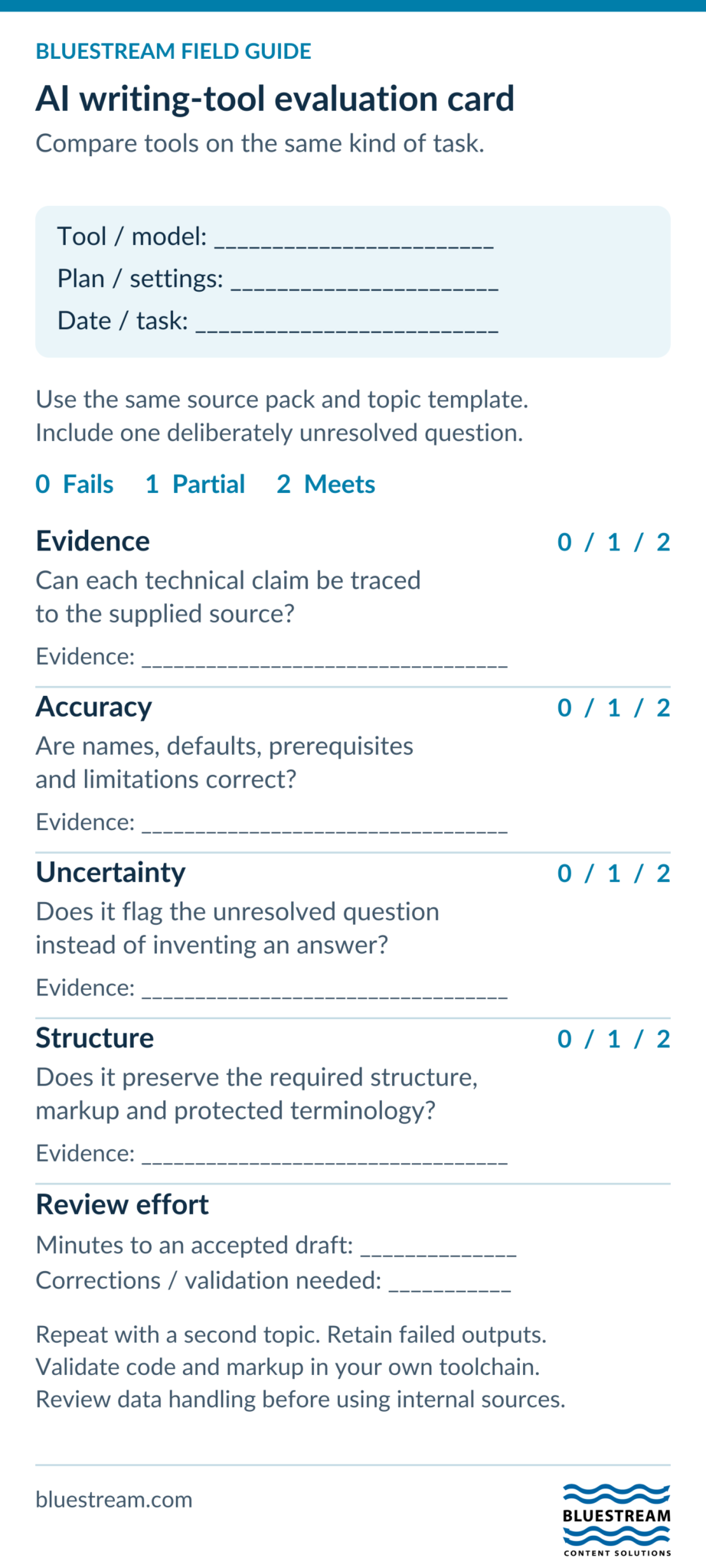
Use an approved or synthetic source pack containing a short specification, a topic template, protected terminology, and one deliberately unresolved question. Record the product, model where available, plan, settings, and test date.

For each result, check:

  • Evidence: Can the reviewer trace each technical claim to the supplied source?
  • Accuracy: Are names, defaults, prerequisites, and limitations correct?
  • Uncertainty: Does the tool flag the unresolved question instead of inventing an answer?
  • Structure: Does the output preserve the required topic structure, markup, and terminology?
  • Review effort: How long does it take to reach an accepted draft, including corrections and validation?

Repeat the test with another representative topic and record failed outputs as well as successful ones. For code examples, include execution against the supported release. Before using internal material, complete your organization’s data-handling review.

This is a proposed evaluation method, not a published benchmark or a claim that the five tools perform equally.

Blank AI writing-tool scorecard for evidence, accuracy, uncertainty, structure and review effort.
A reusable evaluation method, not benchmark results. Compare similar tools on the same task and record failed outputs as well as successes.
Text version of this visual

Blank AI writing-tool evaluation scorecard. Record product, model, plan, settings, test date and task. Use the same approved or synthetic sources and template for comparable tools. Rate evidence, accuracy, uncertainty and structure as zero fails, one partial or two meets, noting evidence. Record review minutes and corrections. Repeat with a second topic, keep failures, validate code and markup, and complete a data-handling review before using internal content. This is a proposed method, not benchmark results.

Where XDocs and XDelivery fit in the workflow

AI drafting tools and content-management systems solve different parts of the process. XDocs DITA CCMS provides structured-content management, including metadata, reuse, version control, and review capabilities. XDelivery provides a documentation delivery experience. Evaluate their role against your authoring and delivery requirements.

A reasonable workflow is to prepare an AI-assisted draft, check its technical accuracy, convert or author it in the approved content model, validate references and metadata, and complete normal review before release. The transfer may be manual, file-based, or integrated depending on your environment. Confirm the supported method with the relevant vendors.

Frequently asked questions

Which AI tool is best for technical writing?

There is no single best choice across all tasks. Compare drafting assistants for source-based prose, code assistants for code context, and editing tools for language review. Use a representative task and the same acceptance criteria for each.

Do these tools integrate natively with XDocs?

This article does not verify native integrations for the five products. Treat the examples as workflow options and confirm connector availability, supported formats, authentication, and review behavior before buying or implementing an integration.

Can an AI-generated DITA topic go straight to publication?

It should pass the same technical review, schema validation, link checks, metadata checks, and release approval as any other topic. Valid XML alone does not establish correct product instructions.

Can we use confidential specifications as prompts?

Only within your organization’s approved service, account, and data-handling rules. Check retention, training use, sharing, access controls, and contractual requirements before supplying confidential material.

Why does the title still say 2025?

This is an updated version of the original 2025 shortlist. The dated editorial note identifies the later review so that historical publication context and current product guidance remain clear.

Contact Us

Sign-up for the latest Bluestream News

Close