
01 / THE CONTENT LIFECYCLE
Tight integration across the workflow
Technical content goes through distinct phases: creation, review, release management, and publishing before the process is repeated for the next release. At each of these key phases, tight integration between Bluestream’s XDocs Component Content Management System (CCMS) and Oxygen XML products from Syncro Soft connects the tools and content-management capabilities used at each stage.
- Author
Create and update content in Oxygen, connected to XDocs.
- Review
Bring subject matter experts into a browser-based workflow.
- Manage releases
Work in parallel branches and review differences before merging.
- Publish
Deliver approved content in the formats your readers need.
02 / DESKTOP AUTHORING
Author in Oxygen. Manage the content in XDocs.
Content creators face many challenges when it comes to creating, updating, and curating content and consistently applying metadata as part of a content strategy.
XDocs’ comprehensive integration with the desktop Oxygen XML Author and Oxygen XML Editor applications lets authors use Oxygen’s desktop applications while taking advantage of the XDocs central content repository with its powerful content management capabilities.
Integration between XDocs and Oxygen has been in continual development since 2011. The embedded XDocs CMS menu in connected Oxygen allows users to browse the content stored in the CCMS, open existing files, and create new files.
Users can save new file versions to the CCMS, place and release locks on files, and insert links, for example, in a DITA topic to image files and content reference files in the CCMS.
In connected Oxygen, content creators also benefit from seamless updates from a centralized list of attribute values in the CCMS and access settings such as for file version comments.
03 / CONTRIBUTION & REVIEW
Bring subject matter experts into the workflow
Technical content requires content contributions and reviews from Subject Matter Experts (SMEs) who are peripheral to the core content team. An SME contributor must periodically create or review content; however, as periodic contributors, they are not part of the core content team and, therefore, are not required to learn DITA and the powerful desktop application tools. In the past, core content team members were tasked with the time-consuming challenge of getting the content contributions and reviews from the SMEs and assimilating the SME work into the content in the CMS in DITA format.
The Oxygen XML Web Author provides a web-based authoring tool that allows users to create and review content from any modern web browser.
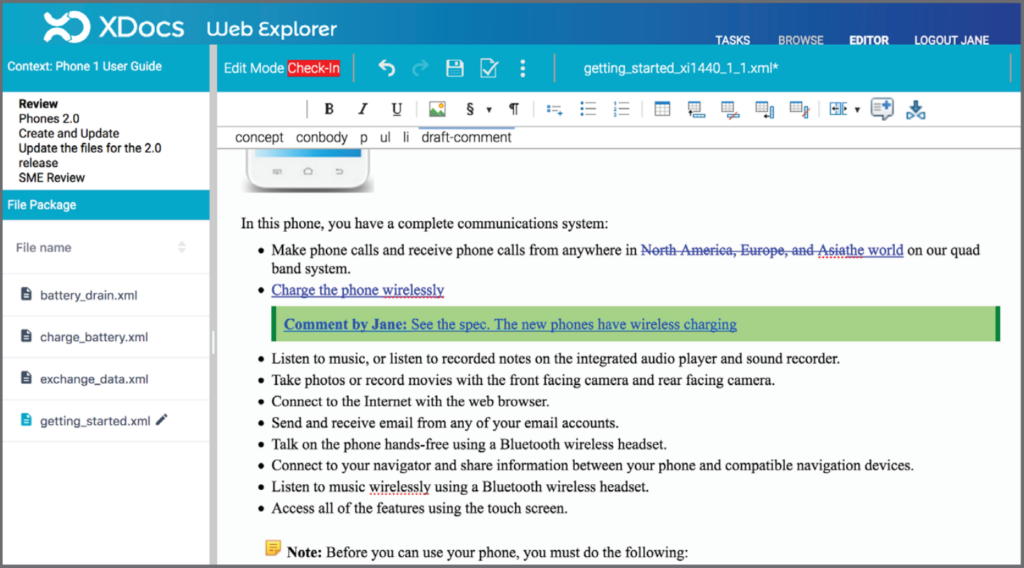
The integration with XDocs means that SME contributors and reviewers can work directly with content in the CCMS from their web browser. The XDocs integrated Oxygen XML Web Author (Wex) has been simplified to create a wiki-like authoring and reviewing experience, which allows Wex users to focus primarily on the content and not the DITA and technology that drives it.
This integration with XDocs allows the SME contributor and reviewer tasks to take place within an automated workflow environment. CCMS content is passed automatically between contributors, authors, reviewers, and editors as each user finishes their task.
The XDocs automated workflow engine sends email notifications to users when they have a task to perform and includes a link to Wex. An SME reviewer can open a browser, log in to see the file package, and mark up files with tracked changes automatically turned on. When the SME presses “finish” in Wex, XDocs moves the file package to the next task in the workflow process.
Connected Oxygen products
- Oxygen XML Web Author
- Oxygen XML Author
- Oxygen XML Editor
- Oxygen XML Developer
A controlled review cycle
- File versioning
- A simplified experience for occasional contributors
- Automated workflow and notifications
- Review, edit and merge versions
04 / RELEASE MANAGEMENT
Keep parallel versions under control
The XDocs CCMS suite of release management tools offers a Branch module, which allows content to be copied from one branch to another, so work can then continue on parallel versions of the content.
XDocs remembers the lineage of the content, so changes in a parallel version can be merged at a later date if required. At branch copy time, XDocs reports on the branched content, and when it identifies a merge, the topic or map can be opened in an Oxygen component, which provides an interface where users can review and accept or reject the differences for the destination branch.
In addition to accepting and rejecting differences in a branch merge file, the Oxygen component also allows XDocs users to edit the merge file text and attributes right inside the Branch module before the branch copy takes place.
The Oxygen component provides XDocs users with the important interface that is required to make decisions and edits at the time of branch merge.
- Branch
Copy content into a parallel version.
- Compare
Review differences using the integrated Oxygen component.
- Merge
Accept, reject or edit changes before the branch copy completes.
05 / PUBLISHING
Deliver content in the formats readers need
The final phase of the content life cycle is to deliver the content to those who need it. XDocs allows content to be published directly from the CCMS to a variety of output formats using filters and date time stamps. Oxygen provides a publishing plugin that is integrated in XDocs and available in the publish menu.
XDocs users can select Oxygen’s WebHelp to transform their DITA and DocBook content into WebHelp output. The Oxygen XML WebHelp output consists of a series of HTML pages that are neatly integrated into a system that offers a table of contents, index navigation, text search capabilities, and various delivery formats, including feedback-enabled systems.
06 / PUTTING IT TOGETHER
A connected content workflow
With XDocs Manufacturing Suite you control the flow of ‘Service Information’ from Engineering to Fulfilment:
- The integration between XDocs CCMS and Oxygen’s suite of products provides a comprehensive solution for all four parts of the content life cycle.
- The intuitive authoring tools address the challenges that content creators face while editing XML documents.
- The web-based collaboration platform helps contributors across the organization engage in content creation.
- The release management technology provides an efficient way for teams to work in parallel and easily compare or merge differences.
- Finally, the publishing features complete the workflow life cycle by offering various output options.