
Structured authoring essentials

Understanding DITA: A Practical Guide for Technical Writers

Three distinct topic cards in an open guidebook illustrate DITA's topic-based approach.

Write focused topicsAssemble with mapsManage shared sources

DITA helps technical writers create documentation as structured, reusable topics. Instead of maintaining separate copies of the same instructions in several manuals, a team can manage a shared source and assemble it into different publications.

For writers new to DITA, the most important shift is deciding what each piece of information is for. A procedure should help someone complete a task. A concept should explain an idea. Reference material should make specific facts easy to find. The markup and tools support those decisions.

This practical guide explains the core building blocks, shows how they fit together, and identifies when the additional structure is worth the effort.

What is DITA?

DITA stands for Darwin Information Typing Architecture. It is an XML-based standard for authoring and organizing topic-oriented information. The OASIS overview describes both its document types and its mechanisms for combining, extending, and constraining them.

XML elements identify the role of information. A title, a step, a command, and a note can be represented differently because they do different jobs. Authors work within a content model instead of deciding every page’s formatting individually.

DITA is a standard, not a particular editor, CCMS, or portal. Those tools can implement and support DITA workflows. Your team’s selected DITA version, document types, and toolchain determine the features you can use in practice.
Start with topics and information types

A topic is a focused unit of information with a clear purpose. It should contain enough context to be useful wherever it appears, while avoiding unnecessary dependence on the chapters around it.

Task: help the reader do something

A task such as “Configure a backup schedule” explains prerequisites, the actions to take, and the expected outcome. The writer needs to know the supported environment and test the procedure. Structure helps organize those facts; it does not supply them.

Concept: explain what the reader needs to understand

A concept such as “How backup retention works” explains an idea or relationship. It can prepare a reader to make a decision without hiding a procedure inside a long explanation.

Reference: provide facts for lookup

A reference such as “Backup scheduling parameters” presents values, definitions, syntax, or limitations. Use consistent labels and units so that the reader can compare entries reliably.

These information types are a useful starting point, not a reason to split every paragraph into a new file. A topic should be as complete as its purpose requires. Extremely small fragments can increase maintenance and make the reading experience harder to follow.

Use maps to organize topics into publications

A DITA map references topics and other resources, arranging them into a collection and defining relationships. The OASIS map specification explains how maps support hierarchy, relationships, and key context.

The same backup concept can appear in an administrator guide and a disaster-recovery guide without making two independent copies. Each map can organize the surrounding topics for its reader’s needs.

A map is more than a table of contents, although it can contribute to one. It can also supply publication context and relationships that influence processing. Review the assembled experience, rather than checking each topic only in isolation.

Reuse content without uncontrolled copying

DITA supports reuse at several levels. A map can reference an entire topic. A content reference can reuse a smaller element, such as an approved note. Keys can provide indirect references that are resolved in the relevant map context.

The OASIS content-reference guidance describes the mechanisms and validity rules. Writers should learn the reuse patterns their team has approved before creating many small dependencies.

Follow one change through two guides

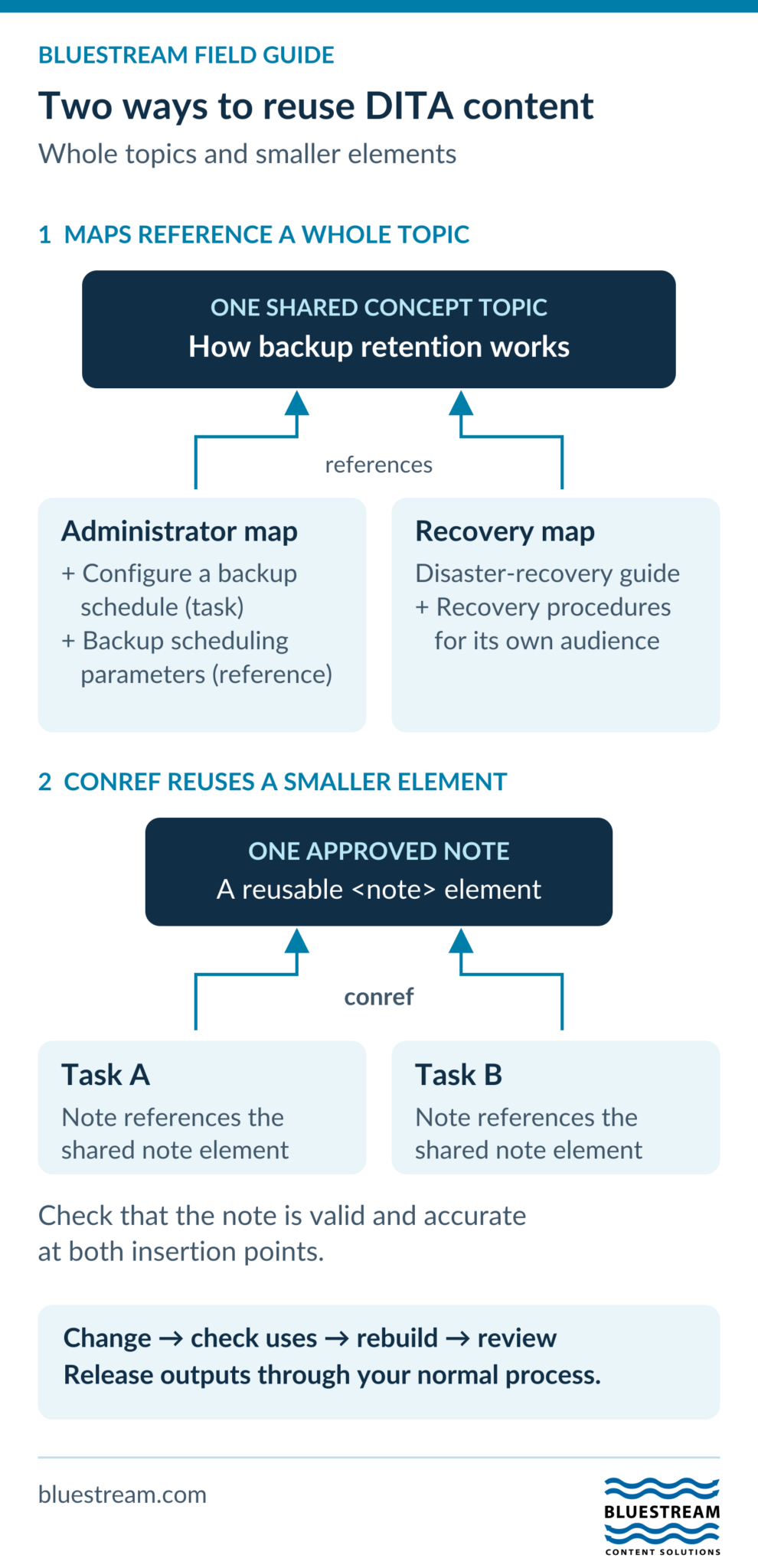
Consider an illustrative backup documentation set. The administrator guide references three topics: ‘How backup retention works,’ ‘Configure a backup schedule,’ and ‘Backup scheduling parameters.’ The disaster-recovery guide references the same retention concept alongside its own recovery procedures.

If the retention explanation changes for the release being prepared, edit that shared topic rather than creating separate guide-specific copies. Check both maps, rebuild both guides, and review the explanation in each reading context.

For a smaller shared element, two tasks could reference the same approved note through conref. The note must remain accurate in both tasks and valid at each insertion point. If one procedure has a different prerequisite, keep that difference explicit rather than forcing reuse.

This example separates two decisions: maps choose where whole topics belong; content references reuse elements within the content. Both create dependencies that the writer must review.

Technical references: OASIS DITA maps and content references.

DITA diagram: two guide maps reference one concept topic; separately, two tasks use conref to reuse one note element.
Whole-topic reuse and element reuse create different dependencies. Check every affected reading context before rebuilding and releasing outputs.
Text version of this visual

Whole-topic reuse: the Administrator map and Disaster-recovery map both reference the single How backup retention works concept topic. The Administrator map also references a backup-schedule task and scheduling reference; the recovery map includes its own recovery procedures. Separately, two tasks use conref to reference one approved note element. Changes require dependency checks, rebuilding, review, and release; they do not automatically update published guides.

Shared source does not mean immediate release

Changing a reused component changes the source available to its consumers. Already published PDFs, released branches, cached pages, and separately managed translations do not necessarily update immediately. They must follow the appropriate rebuild, review, and release process.

Before changing a shared warning or procedure, inspect where it is used. Confirm that the new wording remains correct for every affected product and audience. Reuse reduces duplicate maintenance when the content is genuinely shared; it can spread an error when the shared source is wrong.

Add metadata and conditions deliberately

Metadata can describe product, audience, subject, language, and other context. Some values belong to the topic; others may be supplied by the map or managed in the CCMS. The DITA metadata model supports these different contexts.

Conditional processing allows selected content to be included, excluded, or flagged during publishing. For example, a platform-specific step might appear only in the relevant output. The DITAVAL-based processing model provides a standard mechanism for these decisions.

Keep conditions understandable. If a topic needs many intersecting conditions, consider whether separate tasks would be easier to maintain. Test the resulting variants for missing prerequisites, broken links, and contradictory instructions.

Plan localization around reusable sources

Consistent structure and terminology can make content easier to manage across languages. Reusing an approved source may also reduce repeated translation work, depending on the translation memory, matching rules, and surrounding context.

DITA includes attributes for language, translation, and text direction. Use them according to your content model and localization workflow. Protect code identifiers and product names where appropriate, and preserve meaningful text alternatives for images.

A changed topic is not always the only material that needs review. Terminology changes, reused components, links, and context can affect related translations. Track the source revision associated with each localized deliverable.

Separate authoring from publishing and delivery

DITA source records content structure. A publishing tool transforms that source into an output. For example, DITA Open Toolkit project files can define deliverables, source contexts, formats, and publishing parameters.

A delivery platform then makes the result available to readers. A portal, embedded-help interface, or API-based experience may need additional metadata mappings, navigation, authentication, and application work. DITA supports a reusable foundation, but it does not create every delivery channel automatically.

Review each output for its intended use. A printable guide and a phone-sized help topic may require different navigation and visual treatment even when they share source content.

Where specialization and a CCMS fit

Specialization allows new element or attribute types to be derived from existing DITA types with more specific meaning. It can support a genuine domain requirement, but it introduces design and maintenance work. Start with existing types and constraints before deciding to extend the model.

A CCMS is not required to use DITA. Files, a suitable editor, version control, and a publishing tool can support a working implementation. As the number of products, authors, translations, and dependencies grows, a CCMS can help manage that complexity.

XDocs DITA CCMS provides capabilities for structured authoring and content management. Evaluate any CCMS against your review, reuse, release, metadata, and integration needs. Neither DITA nor a CCMS alone guarantees compliance or ensures that every reader always sees the correct approved version.

When does DITA make sense?

Consider DITA when repeated content, multiple variants, frequent updates, localization, or several publication channels create significant maintenance work. Assess the benefit against migration effort, training, information architecture, and publishing customization.

A small, stable documentation set may not justify the overhead. A larger team can also struggle if it migrates files without changing its authoring practices. The decision should follow the content problem.

Start with a realistic pilot

Choose a small guide with meaningful reuse and at least one variant. Inventory its topics, define the information types and metadata, create one map, publish the required outputs, and test an update to a shared component. Include localization or review steps if they are part of your normal work.

Use the pilot to identify training needs and maintenance costs. Measure the effort to produce and update accepted content, rather than counting converted files.

Frequently asked questions

Do writers need to edit XML code directly?

Not always. Structured editors can provide an authoring view. Writers still need to understand topic types, valid structure, metadata, and the team’s reuse rules.

What is the difference between a topic and a map?

A topic contains information for a particular purpose. A map organizes references to topics and resources and provides publication context and relationships.

Does changing a reused topic update every published manual?

It updates the shared source for relevant consumers, but published outputs and released versions need the appropriate rebuild and release process. Check dependencies before making the change.

Do we need a CCMS to start?

No. You can pilot DITA with files, an editor, version control, and a publishing tool. Evaluate a CCMS when managing the content lifecycle and dependencies becomes difficult at your scale.

How long does it take to learn DITA?

It depends on the team’s experience and the complexity of its content model. Begin with topics and maps, then introduce reuse and conditions through actual work. Avoid promising a universal training timeline.

Contact Us

Sign-up for the latest Bluestream News

Close