

01 / THE FUNDAMENTALS
What is structured content?
Structured and unstructured approaches organize information differently. The important question is how easily the content can be reused, maintained and delivered as your requirements change.
Document-centered content
Documents created in office tools such as Microsoft Word or Google Docs are often organized around the finished publication. Authors may follow corporate guidelines and apply paragraph styles, but appearance alone does not provide a reusable topic-based content model.
When information is copied between documents, updates often depend on manual editing. Sharing and reusing that content consistently across systems can become difficult as the publication set grows.
Structured content
Structured content is created with reuse in mind. Information is organized into defined components and described with markup, so it can be managed separately from its presentation.
This whitepaper focuses on XML-based structured content, including DITA, authored with applications such as Oxygen XML Author or structured Adobe FrameMaker.
02 / THE BENEFITS
Create content once. Put it to work in more places.
Structured content takes planning and discipline, but it can bring considerable benefits when information needs to be maintained across products, publications and channels.
Multichannel publishing
XML separates content from formatting, making “create once, publish everywhere” a practical goal. The same source content can be transformed into formats such as HTML, PDF, XHTML, HTML5 and WebHelp, using the appropriate publishing tools and configuration.
Long-term accessibility
XML is not tied to a single authoring application. This is valuable when documenting products such as ships or trains that may remain in service for more than twenty years. XML is text-based and can be inspected by people as well as processed by software; a long-term content strategy still needs to maintain the relevant schemas, assets and publishing tools.
Consistent updates
In a modular XML system such as DITA, a warning or safety notice can be referenced by multiple publications. Updating the source topic allows the publications using it to be regenerated from that common source. Controlled reuse reduces the risk of missing a copy during a manual update and supports consistent documentation when guidelines change.
Lower localization effort
When DITA topics are reused, unchanged translated topics can be reused as well. Teams can focus localization on new or changed content instead of retranslating every publication. The benefit depends on the amount of reusable content, the translation workflow and the languages involved.
Easier discovery
Structured content is easy to index and DITA makes use of metadata, this can also be used when searching for content.
Information sharing
Because XML is not ‘tied’ to a single application, it is much easier to share content across systems.
03 / WHEN IT FITS
When should you consider structured content?
Structured content is not the best approach for every document. It becomes especially useful when several of these needs overlap:
- Regulatory requirements. Controlled workflows and metadata help teams manage reviews, trace content and apply documentation guidelines consistently.
- Large or complex publications. Modular content is easier to organize and maintain when a publication includes many related topics, cross-references or product variants.
- Localized versions. Topic reuse and change tracking can help teams manage translations and avoid unnecessary repeat work.
- Content reuse. Referencing a controlled source reduces dependence on copying and pasting information into separate documents.
- Long product lifespans. An open, text-based content format supports a strategy for keeping information accessible over time.
- Multiple delivery channels. Separating content from presentation allows the same information to be published in different formats.

04 / XML EXPLAINED
Describe the content, separately from its appearance
XML, the Extensible Markup Language, provides a flexible text format and a set of syntax rules for marking up information. XML vocabularies use those rules to describe particular kinds of content.
Word processors and desktop publishers focus on the formatting of content. When you create new content in these tools, you do so as a part of the layout and formatting process. With XML, you describe the content you are entering, such as a paragraph, a chapter, a book, an article, a caption, or whatever.
XML provides a standard syntax for creating vocabularies to describe your content but does not specify the actual grammar or appearance.
XML Schemas or DTDs (Document Type Definitions) are used to identify the exact labels and grammar of a particular XML vocabulary. While you can invent your own XML vocabulary, doing so means that you will have to customize editing tools to understand your content.
Many XML users adopt a shared standard/common vocabulary instead of creating a vocabulary from scratch. There are standards to represent almost any type of data, whether recipes, musical scores, articles, chapters, books, or anything else. A community around a shared XML standard can share tools and techniques that reduce the effort required to deploy content solutions.
Lastly, XML separates content from appearance; XML tags identify what content is rather than how content should look. As a result, the same XML content can be transformed and published in multiple formats.
06 / DITA IN PRACTICE
From reusable topics to complete publications
DITA stands for Darwin Information Typing Architecture. Initially developed at IBM and now maintained by OASIS, it is an open XML standard used for technical documentation and other topic-based information.
The name reflects the architecture’s use of inheritance, specialization and information types. A topic is a self-contained unit of information that can be read on its own or reused within a larger publication.
DITA maps organize topics and their relationships for a particular context or publication. A map can define the order and structure in which topics appear, while the topics remain separate reusable components.
Three familiar DITA topic types are concept, task and reference. They serve different reader needs:
Concept
Explains an idea, what something is, or how it works.
Task
Explains how to carry out a procedure or achieve a goal.
Reference
Provides facts that a reader needs to look up, such as specifications, parameters or settings.
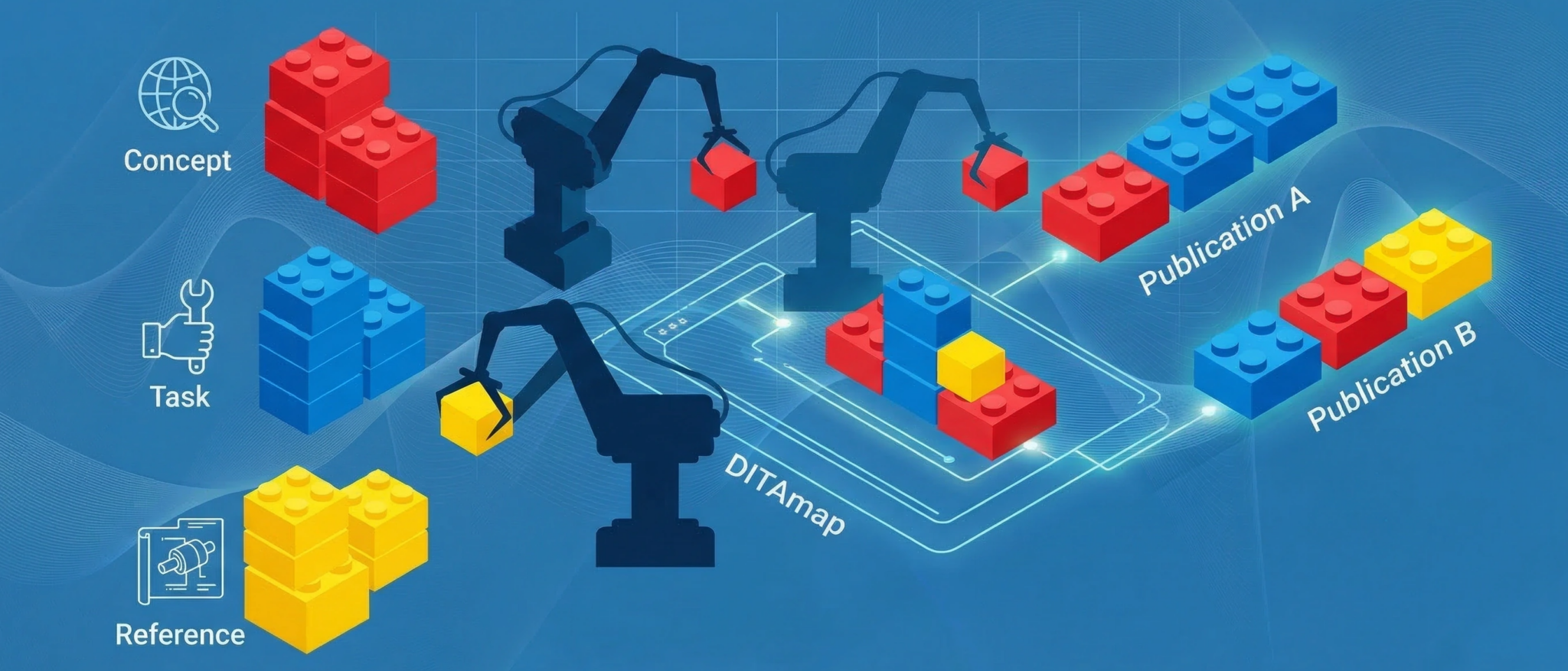
Think of topics as building blocks
Like building blocks, the same topics can be assembled into different structures. This is useful when a company produces several products that share components: relevant information from one manual can be referenced in another rather than copied into a new version.
The same principle applies to localization. If a new manual reuses 60% of its topics unchanged, those topics may already have approved translations. This is an example of potential content reuse, not a promise of a 60% reduction in the total localization budget. Review, terminology, layout and other work can still be required.
07 / PUBLISHING
Publish from a shared source
DITA Open Toolkit transforms DITA topics and maps into output formats. Its current default transformations include HTML-based formats, PDF and Markdown; additional output formats are available through plug-ins.
The available publishing formats depend on the toolkit version and installed plug-ins. Keeping the source content separate from the publishing configuration lets teams adapt presentation and delivery without rewriting every topic.
08 / CONTENT MANAGEMENT
Choose a management approach that fits your team
To gain the benefits of structured content, it must be managed consistently. A component content management system (CCMS) provides a dedicated environment for that work. An open-source repository and a supporting toolchain are another option.
The right choice depends on your team’s skills, workflow, integration needs and capacity to maintain the system. Evaluate the complete solution, including implementation and ongoing support.
CCMS: strengths to assess
- Predictability. Documented features and demonstrations make it easier to assess what the system does and how it is priced.
- Integrated capabilities. A commercial system can provide a range of content-management features in one supported environment.
- Implementation. An established product may reduce the amount of custom development needed, although configuration and migration work still need to be planned.
CCMS: questions to ask
- Technology and roadmap. Understand the underlying architecture and how the vendor maintains and develops it.
- Provider dependence. Check support options, implementation partners and how easily content can be exported.
- Total cost. Compare licensing, implementation, upgrades, integrations and ongoing support rather than assuming one model is always cheaper.
- Customization. Confirm which requirements can be configured, which need development, and how changes affect future upgrades.
Open-source toolchain: strengths to assess
- Customization. Established components can be adapted to specific requirements, both initially and as needs change.
- Flexibility. A toolchain can be integrated with other technologies and internal systems.
- Community support. Active projects may have a broad community of contributors and users, although heavily customized solutions need their own support plan.
- In-house development. Internal teams can extend the solution when they have the necessary skills and capacity.
Open-source toolchain: questions to ask
- Upfront effort. Estimate the work needed to assemble, adapt and test the complete solution. Custom development can outweigh the cost of a ready-made CCMS.
- Maintenance and support. Assign responsibility for updates, documentation and troubleshooting. Ensure knowledge is shared so the system does not depend on a single person.
09 / WIDER USES
Make structured content useful across the organization
Many companies are now accumulating vast amounts of data in a format that can be easily re-used and automatically output in a multitude of formats, but where should they look to take further advantage of DITA?
Support teams
Responding quickly and effectively to customer issues is more critical now than ever, but Customer expectations are also evolving.
Today everyone expects information to be more accessible; if you have a problem you search Google (other search engines are available), and irrespective of the device you are using (PC, Smartphone, Tablet etc.), fractions of a second later, you receive pages of results - these pages are full of links to multiple sites offering answers in various ways; blogs, wikis, videos, message boards, and forums.
This is how users now expect to receive data; it is no longer sufficient to just deliver a PDF of a manual and expect someone to trawl through it to find the relevant section.
How do you migrate both technical and nontechnical information from static documents into dynamic Topic-based content that can be delivered instantly to any platform, providing engineers, prospects, and customers tailor-made answers?
One obvious solution is to start leveraging your DITA content - this is already broken down into Topics, and with the right tools, these can be selected by either the customer or support team member via wizards to build dynamic documents published in the desired way.
Video/links can be embedded in electronic documents to allow the recipients to access additional instructions if required.
Training
Training teams often create slides by manually copying information from technical manuals. When the source is in DITA, a suitable publishing workflow can reuse that information to generate slides and supporting reference material, reducing the need to maintain separate copies.
Marketing
DITA is not a solution for everything, but marketing departments in high-tech manufacturing companies can reuse DITA content to ensure technical specifications are kept up-to-date on brochures and utilize the flexibility of XML to publish material across channels.
Service engineers
Engineers in the field can spend a long time looking through long PDFs, or even paper manuals. Publishing machine/installation-specific documentation accessible on any device/platform can make the relevant information easier to access. This documentation, especially IPCs (Illustrated Parts Catalogs), can also be directly linked to parts fulfillment systems.